 tacey
tacey Install on Shopify
Pages that load in around 2.4 seconds convert at 1.9%. Pages that take 5.7 seconds or longer convert at just 0.6%. This is a 68% drop in conversion rate from a three-second difference in load time. For a store doing $40,000 a month, this is the difference between $40,000 and $12,600 in revenue from the same traffic.
Most merchants see their conversion rate as a marketing problem. Page speed is a conversion issue that underlies everything else. It is one of the few levers a Shopify merchant can pull that compounds permanently. Unlike ad spend, the benefits do not stop when you stop paying for them.
This article covers what Core Web Vitals are and why they matter for Shopify stores. We will look at what causes stores to fail them and outline a methodical approach to fixing the issues. The goal is to improve your store's performance and increase conversions.
What are Core Web Vitals and why do they matter for my store?
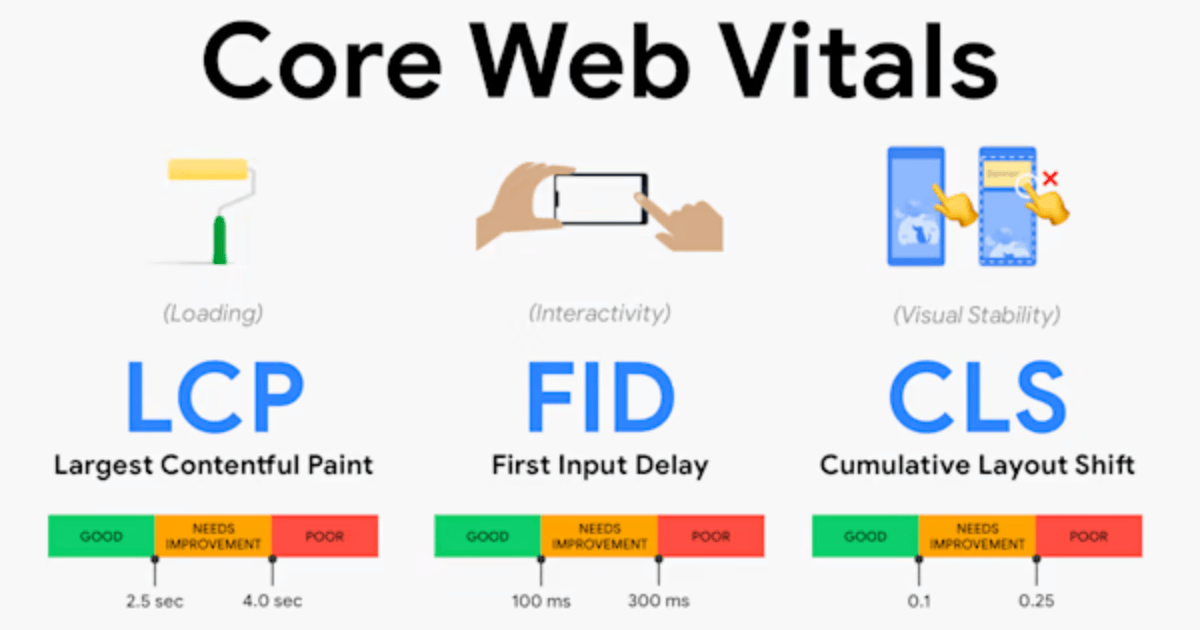
Core Web Vitals are Google's standardized metrics for user experience. They include Largest Contentful Paint (LCP), Interaction to Next Paint (INP), and Cumulative Layout Shift (CLS). They matter because Google uses them as a ranking factor, and they directly correlate with your store's conversion rate and user engagement.
Google's Core Web Vitals are a set of metrics that measure real-world user experience on web pages. They became a ranking signal in 2021 and continue to be refined. The three current metrics are essential for any online store to understand.
| Metric | What It Measures | "Good" Threshold |
|---|---|---|
| Largest Contentful Paint (LCP) | How long it takes for the largest visible element, like a hero image, to load. | Under 2.5 seconds |
| Interaction to Next Paint (INP) | How quickly the page responds to user interactions, like tapping a button. This replaced First Input Delay (FID) in March 2024. | Under 200 milliseconds |
| Cumulative Layout Shift (CLS) | Visual stability, or how much elements move unexpectedly as the page loads. | Below 0.1 |
Google made these metrics ranking factors for a simple reason. Pages that load slowly and behave unpredictably have lower engagement and higher bounce rates. These are outcomes Google's search product tries to minimize. The link between Core Web Vitals and conversion performance is not a coincidence. It reflects user behavior documented by Google's own research.
Google found that people with a negative mobile experience are 62% less likely to purchase from that brand in the future. This is not just about a single lost sale. A slow site can damage your brand perception and deter future visits. Speed is a feature of your brand, not just a technical metric.
How do Shopify stores perform on Core Web Vitals?
Shopify's platform is fast by default, with about 65% of stores passing Core Web Vitals on mobile. This is better than many competitors. However, 35% of stores still fail, usually because of third-party apps, heavy themes, and unoptimized images added by the merchant, not because of Shopify itself.
According to the CrUX Technology Report (June 2025), Shopify ranks second overall for Core Web Vitals pass rates among major platforms. Its 65% mobile CWV pass rate is well ahead of WordPress (44%). This default speed comes from Shopify's global CDN, automatic image optimization, and fast base themes like Dawn.
The bad news is that a significant number of Shopify stores still fail Core Web Vitals on mobile. The failures are almost entirely caused by what merchants add on top of the platform. The gap between the best and worst performing stores is wide, as seen in conversion data.
According to LittleData's benchmark survey of 2,800 Shopify stores:
- Average Shopify store conversion rate: 1.4% to 1.8%
- Top 20% of stores: 3.2% conversion rate
- Top 10% of stores: 4.7% or higher
- Mobile conversion average: 1.2% vs desktop 1.9%
The difference between a 1.4% and a 4.7% conversion rate is not just about product quality or marketing. It is largely explained by the user experience a store delivers. Page speed is the most measurable and fundamental part of that experience.
How much does page speed really affect my conversion rate?
The impact is significant and well-documented. A one-second delay in page load time can reduce conversions by about 7%. Faster pages consistently convert better. For example, pages loading under 2.5 seconds can convert twice as much as pages that take over four seconds to load.
Multiple sources confirm the strong relationship between page speed and conversion rate. The data is consistent enough to treat this correlation as a fact.
- A 1-second delay in load time reduces conversions by approximately 7% (Red Stag Fulfillment, 2025).
- Walmart found that each 1-second faster page delivered +2% higher conversions, based on internal data.
- Pages loading under 2.5 seconds convert 2x more than pages loading above 4 seconds (Google Core Web Vitals data, cited in EasyApps 2026 guide).
- Sites failing Core Web Vitals see lower conversion rates and lower search rankings, creating a dual penalty (Envive, 2026).
The 2026 Shopify conversion benchmark data from Build Grow Scale adds more context. Stores with an AOV under $50 often convert at 3, 4%, while stores with an AOV over $500 average 0.8, 1.2%. This shows that speed improvements scale with order volume, not just conversion percentage. A small lift can mean many more orders at no extra acquisition cost.
"Conversion rate by itself doesn't accurately spot what's broken in a Shopify store. Track it alongside click-through rate, add-to-cart rate, and net profit on ad spend. Together they will help diagnose true store performance."
, Harry Chu, Founder, TrueProfit
What are the main causes of a slow Shopify store?
Most slow Shopify stores are caused by four main issues: too many apps injecting code (app bloat), large unoptimized product images, third-party scripts like analytics or chat widgets loading slowly, and heavy themes with too many features. These are all things merchants can control and fix.
1. App Bloat
Every app can inject JavaScript into your pages, slowing them down. A single poorly coded review widget can hurt your INP score more than ten lightweight utility apps. Stores with 20 or more apps often have multiple scripts loading at once, causing conflicts and blocking the page from rendering quickly.
The Core Web Vitals guide for Shopify (corewebvitals.io, 2026) states: "The biggest causes of CWV failure on Shopify are apps (installed apps injecting JavaScript globally), unoptimized hero images, third-party scripts, and heavy themes with too many features."
To test this, disable apps one by one and measure the impact in Google PageSpeed Insights. Remove unused apps and check for "ghost code" left by uninstalled apps. This leftover code is common and hurts performance.
2. Unoptimized Product Images
Large, unoptimized images are the single biggest cause of slow LCP scores on Shopify. A 4MB JPEG that could be a 180KB WebP file adds seconds to your load time. While Shopify converts images to WebP automatically, images embedded in theme files or from some apps might bypass this process.
You should compress every image before uploading it. Serve images at the correct dimensions for their display size. Use WebP format where possible. For stores with many images, bulk image compression tools like Crush.pics or TinyIMG can automate this work.
3. Third-Party Scripts Loading at Page Start
Chat widgets, analytics pixels, and review scripts all add load time. Most of these are configured to be render-blocking, meaning they load before your main content. They could instead be deferred to load after the page is visible. This simple change can dramatically improve perceived speed.
Running multiple scripts simultaneously can add 800ms to 1.5 seconds before your page is interactive. This pushes INP scores well above the 200ms threshold. Remove scripts that do not provide measurable value and configure the rest to load asynchronously. Google Tag Manager can help manage this.
4. Heavy Themes with Excessive Features
Themes with large homepage sliders, parallax effects, and custom fonts add weight that slows down rendering. Shopify's own Dawn theme is optimized for Core Web Vitals and serves as a good baseline for performance. Compare other themes against it.
If your current theme scores poorly in PageSpeed Insights and the vendor is not focused on performance, consider switching. The cost of migrating to a faster theme is often lower than the ongoing revenue lost due to a slow site's conversion penalty.
What parts of Shopify page speed can I not control?
Because Shopify is a managed platform, you cannot control server-side settings, core platform scripts, or CDN configurations. This is not a problem, as Shopify's infrastructure is already fast. Your optimization efforts should focus on the areas you can control: your theme, apps, images, and third-party scripts.
This managed environment creates constraints that do not apply to WordPress or custom sites. Specifically:
- You cannot implement server-side caching configurations.
- You cannot modify Shopify's core storefront JavaScript.
- You have limited access to the HTTP response headers.
- Some performance tricks for self-hosted platforms are not available.
This is not a reason to ignore performance. Instead, it helps you focus your efforts on the areas that matter most on Shopify. These areas account for the vast majority of the performance gap between a fast store and a slow one.
"Shopify is fundamentally different from WordPress or custom-built sites when it comes to Core Web Vitals. On WordPress, you control everything. On Shopify, you are working within a managed platform where some things are out of your hands entirely. Despite all this, Shopify actually leads WordPress on CWV pass rates because its infrastructure is fast by default."
Does my store's speed affect its Google search ranking?
Yes, absolutely. Google uses Core Web Vitals as a ranking signal, especially on mobile. A faster page can rank higher than a competitor with similar content. Since most Shopify traffic comes from mobile, a slow mobile experience hurts both your search ranking and your conversion rate.
The dual impact on conversions and SEO makes Core Web Vitals a high-leverage investment. On the SEO side, Google uses speed as a tie-breaking ranking signal. For competitive keywords, moving from position 4 to 2 can mean a significant traffic increase. Page speed is a direct SEO lever.
The mobile dimension is critical. 79% of Shopify traffic comes from mobile devices, but mobile conversion rates are much lower than desktop (1.2% vs 1.9%). Google ranks pages based on their mobile experience. A store that is slow on mobile is being ranked and converted at that lower performance level for most of its traffic.
The Shopify Commerce Trends 2026 report highlights INP as a key challenge for brands with media-heavy pages. The fix for a high INP score is reducing JavaScript execution time. This usually means removing unused app scripts and replacing heavy theme elements with leaner code.
How can I check my Shopify store's page speed?
Use Google's free PageSpeed Insights tool. Test your homepage, a popular collection page, and a best-selling product page. The report will give you specific scores for LCP, INP, and CLS, along with a prioritized list of recommendations like eliminating render-blocking resources and properly sizing images.
The starting point for any speed improvement is measurement. Run Google PageSpeed Insights on these key pages:
- Your homepage
- Your highest-traffic collection page
- Your best-selling product page
- Your cart page
The tool provides both lab data (simulated) and field data (real user data). Google uses field data for ranking, while lab data helps you diagnose issues. The most common high-impact recommendations for Shopify stores include:
- Eliminate render-blocking resources, like third-party scripts loading synchronously.
- Reduce unused JavaScript from apps loading on pages where they are not needed.
- Properly size images to match their display dimensions.
- Serve images in next-gen formats like WebP and AVIF.
- Reduce initial server response time, which is affected by theme complexity.
For a simpler overview, you can start with Shopify's built-in online store speed report. It provides a high-level view before you dive into the details of PageSpeed Insights.
What do the fastest Shopify stores do right?
Top-performing stores consistently pass Core Web Vitals. They use optimized WebP images, minimize third-party scripts, and choose lean, mobile-first themes. They manage their app count carefully and ensure their site is visually stable, with no layout shifts. Speed is their foundation for a high conversion rate.
The stores converting at 4.7% or higher share these technical traits:
- LCP under 2.5 seconds on mobile, using WebP images and lazy loading.
- INP under 200ms, achieved by minimizing and deferring JavaScript.
- CLS below 0.1, by setting image dimensions and avoiding dynamic content above the fold.
- App count is kept to a minimum of essential, high-value tools.
- Mobile-first theme design with large, easy-to-use tap targets.
The 2026 Shopify fashion CRO guide summarizes the priorities: "Speed up performance: Hit Core Web Vitals targets, especially INP ≤ 200ms on media-heavy PDPs. Surface social proof. Personalize intelligently. Modernize checkout." The order is important. Speed comes first because it enables all other optimizations.
Is improving my page speed a good investment?
Yes, it is one of the best investments you can make. Unlike a marketing campaign, a speed improvement is a permanent, one-time fix that increases revenue from all traffic sources. The return on investment is often significant, generating thousands in additional annual revenue from the same traffic.
The math is compelling. A speed improvement compounds over time. Every visitor benefits, across every channel, for as long as the fix is in place. Consider a store with 10,000 monthly visitors, a 1.6% conversion rate, and an $85 AOV.
- Current monthly revenue: $13,600
- After a speed improvement lifts conversion to 2.0%: $17,000
- Annual revenue difference: $40,800 from the same traffic
The cost of a Core Web Vitals audit is typically a few hours of work or a few hundred dollars if outsourced to a developer. The annual return on that small investment is significantly higher. No paid marketing channel delivers that kind of return on a one-time cost. Speed does.
Frequently asked questions
What is a good conversion rate for a Shopify store?
The average Shopify store converts between 1.4% and 1.8%. However, the top 20% of stores convert at 3.2%, and the top 10% reach 4.7% or higher. These top performers typically have excellent page speed and user experience.
What is the biggest cause of a slow Shopify store?
The most common causes are unoptimized images and "app bloat" from too many installed apps injecting code. Heavy themes with excessive features and third-party scripts like chat widgets also significantly slow down stores. These are all factors the merchant can control.
Will changing my Shopify theme make my store faster?
It can make a huge difference. If your current theme is heavy with features and scores poorly on speed tests, switching to a lightweight, performance-optimized theme like Shopify's Dawn can provide an immediate speed boost. The cost of migrating is often less than the revenue lost to a slow site.
Why is my mobile speed more important than desktop?
About 79% of all Shopify traffic comes from mobile devices, so most of your customers have a mobile experience. Furthermore, Google uses mobile-first indexing, meaning it primarily uses your site's mobile performance to determine its search rankings. A slow mobile site hurts both conversions and SEO.
Does Shopify automatically optimize my images?
Yes, Shopify's CDN automatically converts images to modern, fast formats like WebP. However, this only applies to images served through the standard liquid `image_url` filter. Images embedded directly in theme files or uploaded via some third-party apps may bypass this optimization and slow down your site.
What is Interaction to Next Paint (INP)?
INP is a Core Web Vital that measures how quickly your page responds to user interactions like clicks, taps, or typing. A "good" INP is under 200 milliseconds. It is a critical metric for ecommerce because slow responses to actions like "add to cart" directly impact sales.
 Install on Shopify