tacey
 Install on Shopify

Returns are a fixture of selling apparel online, but they are not a fixed cost. For many Shopify stores, the single largest operational expense is not acquiring the customer, but handling the return after a wrong-size purchase. The good news is that a significant portion of these returns can be intercepted before the item ever leaves your warehouse, by giving the customer a brief window to correct their own mistake.
What is the average return rate for online fashion stores in 2026?
While no single number applies to every store, return rates in online fashion are consistently among the highest in ecommerce. It is common for apparel brands to see a substantial fraction of orders come back, creating significant reverse logistics costs that eat directly into profit margins and challenge the economics of a sale.
This rate is not just a line item on a spreadsheet; it represents wasted shipping materials, labor costs for processing, and often, inventory that cannot be resold at full price. For fashion merchants, managing this flow is a core operational challenge that directly impacts profitability and scalability.
Unlike other product categories, fashion purchases are deeply personal and fit-dependent. This makes the likelihood of a return much higher from the outset. Reducing this rate, even by a few percentage points, can have an outsized effect on a store's financial health.
A worked example: The true cost of a single return
Imagine a dress sold for $100. The cost of its return is not zero; it is a cascade of expenses that compound. First, there is the cost of return shipping, which the merchant often covers. Then, an employee must spend time receiving the package, inspecting the garment, and processing it back into the system, all of which is a direct labor cost.
Beyond these direct costs, the returned dress itself often loses value. It may need steaming, refolding, and repackaging to be sellable again. If it was a seasonal item, it might have missed its prime selling window and now must be sold at a discount. The original $100 sale can quickly turn into a net loss when all these factors are combined.
Why is 'wrong size or fit' the #1 reason for apparel returns?
The primary driver for fashion returns is simple: customers cannot try on clothes online. Despite detailed size charts and model photos, a shopper is always making their best guess about how an item will actually fit their unique body. This information gap is the fundamental reason 'wrong size or fit' dominates return reasons.
A customer might be a medium in one brand and a large in another, or even vary between different items from the same brand. This inconsistency, sometimes called "vanity sizing," teaches shoppers to bracket their size, ordering two sizes of the same item with the intention of returning one. This behavior further inflates return statistics.
This bracketing behavior is a rational response to an industry with no standardized sizing. It protects the customer from a bad fit but makes a return for the merchant almost certain. The inventory for the returned items is tied up in transit and processing, unavailable for other customers to purchase, creating a hidden cost.
Often, the realization that a mistake was made comes moments after the purchase. A customer might remember a past purchase, consult a size chart too late, or simply have a moment of doubt. Without a way to correct the order immediately, that doubt turns into a likely return.
How can customers change their size after placing a Shopify order?
Traditionally, changing an order on Shopify required the customer to contact support immediately. They would need to find your contact email or form, write a message detailing the mistake, and hope an agent sees it before the order is picked and packed. This process is slow, manual, and stressful for both parties.
This manual workflow is prone to error. A support ticket might not be seen in time, especially if placed overnight or during a busy sales period. If an order is sent to an automated 3PL, it might be picked within 15 minutes, long before a support agent starts their day. The result is an unhappy customer who receives the wrong item and a costly, preventable return for the merchant.
A more modern approach allows customers to make these changes themselves directly on the order confirmation page. By providing a self-service option, merchants empower customers to fix their own mistakes within a specific timeframe, reducing the need for manual intervention and support tickets.
What is a post-purchase order edit window?
A post-purchase order edit window is a set period of time after a customer completes payment during which they can modify their order. This window exists on the thank-you and order status pages, before the order details are sent to your fulfillment center or warehouse for picking.
The length of this window is determined by the merchant and is based on their own fulfillment operations. A store that ships orders within two hours of receipt might set a one-hour edit window. A store with a 24-hour processing time could offer a longer window of four to six hours.
The key is that the window closes before the fulfillment process begins. This way, any changes are captured before physical goods are packed and a shipping label is created. It turns a potential return into a simple data update in your Shopify admin, with no physical product movement.
The edge case: Highly automated fulfillment
What if your fulfillment is nearly instant? Some third-party logistics (3PL) providers are so integrated that an order is sent to the warehouse floor within minutes of being placed on Shopify. In these cases, a one-hour edit window is already too long. The order could be picked and packed before the customer even has a chance to make a change.
For these merchants, the solution is a much shorter window, perhaps only 10 to 15 minutes. Another approach is to work with the 3PL to build a standard delay between when an order is received and when it enters the picking queue. This intentionally creates the edit window, giving a customer time to catch a mistake without disrupting overall shipping promises.
How does letting a customer change their order size reduce costs?
Allowing a customer to change a size before shipment replaces a costly physical return with a simple digital update. A typical return involves the cost of return shipping, inspection and restocking labor, and potentially lost value if the item is returned damaged or out of season. A pre-fulfillment edit has none of these costs.
The named trade-off: Automation vs. manual control
By automating size changes, you trade the perceived control of manually approving every order change for the efficiency and cost savings of a self-service system. The manual approach feels safer but is slow and expensive. The automated approach is faster and cheaper but requires trusting both the customer and the technology's guardrails.
When a customer corrects their own order, they prevent the wrong item from ever being shipped. This saves on outbound shipping costs for the incorrect item and the full chain of reverse logistics expenses. The only operational impact is that the warehouse picker grabs a different size of the same product.
This self-service capability also reduces the burden on your customer support team. Instead of fielding urgent emails and manually editing orders, your agents can focus on more complex issues. The customer resolves their own problem instantly, improving their experience and saving you labor costs.
Your best customer is the one you already have. Letting them fix a small mistake easily, without having to ask for permission, is a mark of respect for their time and their business.
Can a customer swap for a different color post-purchase?
Yes, the same mechanism that allows a customer to change their size can also be used for swapping colors or other variants of the same product. From a logistical standpoint, changing from a blue shirt to a red shirt is identical to changing from a medium shirt to a large one, provided the price is the same.
This functionality gives customers the confidence to correct any simple mistake made during the checkout process. A "fat finger" error where they tapped the wrong color swatch can be fixed in seconds on the order status page, preventing a return and a disappointed customer.
A key consideration is how the tool handles inventory. For the change to be successful, the newly selected size or color must be available. If a customer can select a sold-out item, it creates a new problem: an unfulfillable order. A well-designed tool will only present choices that are in stock, preventing this subsequent frustration.
If the new color or variant has a different price, the system can handle that as well. A more expensive choice would prompt the customer to pay the difference before the change is confirmed. A cheaper one can result in a refund, often pending merchant approval.
A worked example: Handling a price difference
Imagine a customer buys a standard cotton t-shirt for $30. On the order confirmation page, they realize they meant to buy the limited edition version with a special print, which costs $38. With a post-purchase editing tool, they can select the new variant. The system will automatically calculate the $8 difference.
The customer is then prompted to pay the outstanding $8 using the original payment method. The order is only updated in Shopify once this payment is successfully captured. This process protects the merchant from being left out of pocket.
What happens when this goes wrong? Without this flow, the customer might receive the wrong item and initiate a return. The merchant then loses the original shipping cost, pays for the return, and also loses the potential $8 upsell. The total cost of the error could easily exceed $25, all to fix an $8 value mismatch.
What's the difference between an exchange and a pre-fulfillment edit?
The critical difference is timing and logistics. A pre-fulfillment edit happens digitally, after payment but before the order is physically handled. An exchange is a physical process that happens after the customer has received the incorrect item and shipped it back to you.
An exchange involves two-way shipping, warehouse processing for the return, and then a separate fulfillment process for the new item. It is a complex and expensive workflow. An edit, by contrast, simply alters the order details before the first shipment ever occurs, collapsing that entire process into a single click.
Customer Effort Score: The hidden metric
An important concept here is the Customer Effort Score (CES), which measures how easy it is for a customer to get something done. A pre-fulfillment edit is a low-effort action; the customer clicks a link on their order page and makes a change. It takes seconds. An exchange is a high-effort process involving printing labels, packaging items, and visiting a drop-off point.
Lowering customer effort is a powerful way to build loyalty. When a customer can fix a problem with minimal effort, their perception of the brand improves. A high-effort process, even with a good outcome, can leave a customer feeling frustrated and less likely to shop with you again.
Think of an edit as correcting a typo in an email before you hit send. An exchange is like mailing a letter, realizing the mistake, and then waiting for the recipient to mail it back so you can send a corrected version. The efficiency of catching the error early is immense.
How do I set up self-serve size changes on my Shopify store?
Shopify does not include this functionality natively. To allow customers to edit their own orders post-purchase, you need to add an application from the Shopify App Store. These apps integrate with your order status page to provide the editing interface for your customers.
When choosing an app, you will configure an edit window that matches your store's fulfillment speed. You can set rules for what can be changed, such as allowing size and color swaps but not changing the product entirely. This helps align the edits with your business policies.
A concrete step is to map your entire order flow, from checkout to the moment a picker physically takes an item. Time it. Your edit window must be shorter than that time. If it takes your warehouse 90 minutes to pick and pack an order, a 60-minute edit window is safe. This simple time-and-motion study is the most critical part of setup.
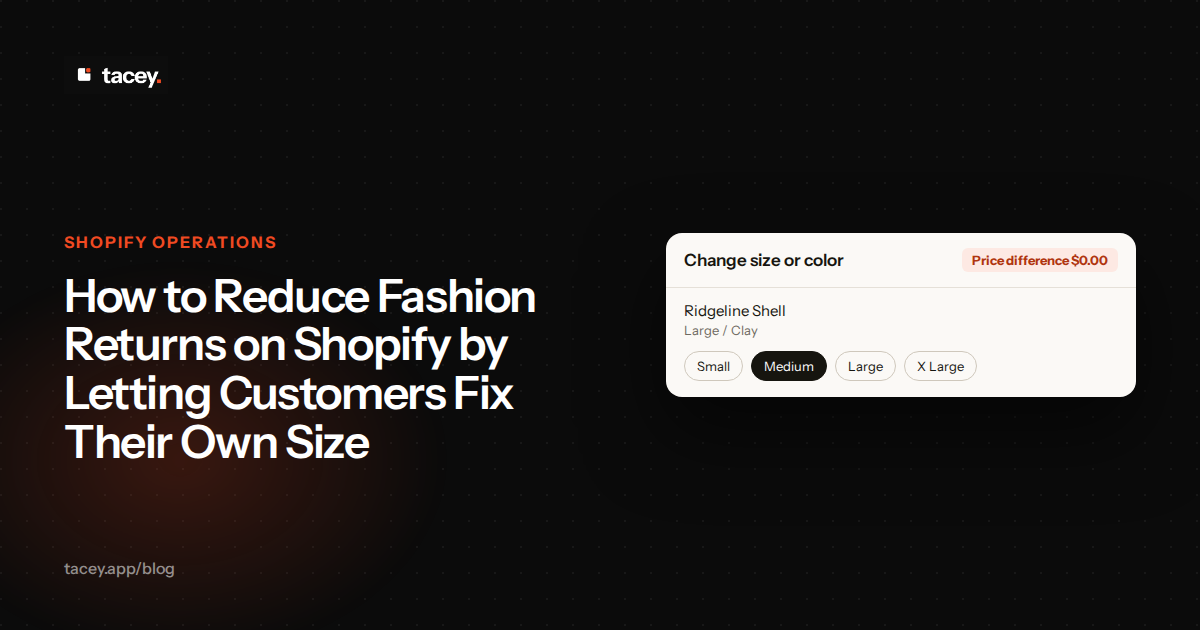
For example, an app like Tacey allows customers to change product options like size and color themselves. The tool is enabled by default and appears on the order status page immediately after checkout, giving shoppers a chance to make corrections.
When a customer swaps a size Small for a size Large, the order is updated in your Shopify admin before it ever goes to your pick list. This workflow directly addresses the most common cause of fashion returns by fixing the mistake digitally.
By giving your customers the power to fix their own simple mistakes, you address the root cause of most apparel returns. This small window of opportunity after the sale can significantly lower your operational costs and improve the overall customer experience.
This kind of post-purchase flexibility is what turns a one-time buyer into a loyal customer. For a direct way to implement customer-led order editing, you can install Tacey from the Shopify App Store.
Frequently asked questions
Does letting customers edit orders delay my shipping times?
No, it should not affect your shipping times if the edit window is set correctly. The window should be shorter than your standard processing time, ensuring all edits are finalized before your team begins fulfilling orders. For example, if you ship within 24 hours, a 4-hour edit window works perfectly.
What if a customer changes to a size that is out of stock?
Ideally, an editing app checks Shopify's inventory in real time. This means out-of-stock sizes would not be selectable. If a tool allows an out-of-stock selection, it can create a new fulfillment problem, so this capability is an important factor when choosing a solution for your store.
Can I limit how many times a customer can edit their order?
Yes, most order editing applications allow you to set a limit on the number of edits a customer can make. This helps prevent indecisive changes and lock in the order details well before the fulfillment process begins. A limit of one or two edits is common.
Will this work for international orders?
Yes, post-purchase editing functions the same for both domestic and international orders. The ability for a customer to correct their size is independent of the shipping destination, as it all happens before any customs or shipping labels are generated.
What happens if a customer wants to change their address instead of their size?
Most comprehensive post-purchase editing tools handle address edits as a separate, parallel function. Customers can typically correct typos in their shipping address within the same window, which helps reduce failed deliveries in addition to reducing returns.
Does this cost the customer anything?
If a customer is swapping for a different size or color of the same product and the price is identical, there is no additional cost. If they were to change to a variant that costs more, they would pay the difference before the order is updated.
Can customers cancel their order using this same tool?
Yes, many post-purchase suites offer self-serve cancellation, which you can enable for your customers. You can set rules for when a cancellation is possible, such as only before the order enters fulfillment. When a customer uses this option, the order is automatically cancelled and their payment is refunded.
 Install on Shopify