tacey
 Install on Shopify

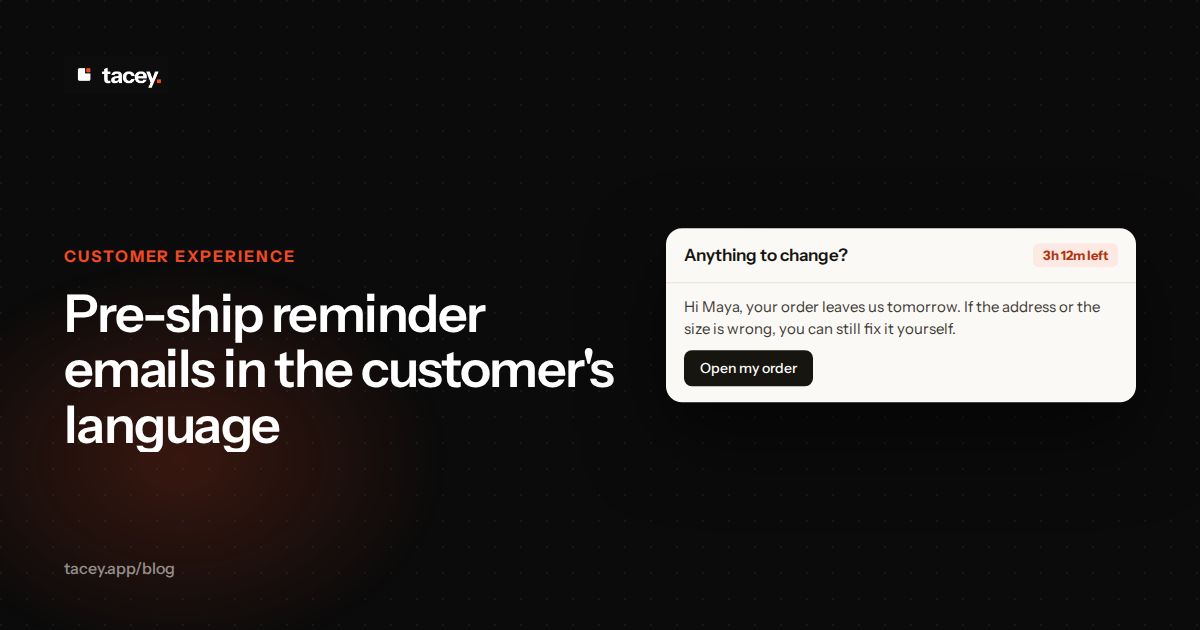
When you send an order reminder, it should be in the language your customer actually speaks. Tacey's pre-ship reminders are automatic emails sent in the customer's own language, during the edit window you set. This means your international customers receive clear, actionable information without needing a translation tool, reducing mistaken orders and support requests before they happen.
This single email occupies a critical moment. It arrives after the customer has paid but before you have committed resources to shipping. This pre-shipment window is your last, best chance to fix a mistake while it is still cheap. A clear, localized reminder makes it easy for the customer to help you get their order right the first time.
Which language does a reminder email use?
Tacey's pre-ship reminder is sent in the customer's own language. You do not choose a language for each order, and you do not build a separate email template for each market. The reminder is an automatic email, sent while the customer can still edit the order and before the order ships.
This process happens without extra work from you. You do not need to segment your customer list by country to make it happen. What you do need to check is any wording you wrote yourself, which is covered in the next section. The rest of the reminder is handled for you.
Before you rely on the reminder for a new market, read a sample of it yourself. Place a test order from that country, then read the email the way your customer would. Look for anything that reads oddly, and fix your own text before a real customer sees it.
There are edge cases, of course. A customer may read one language while shipping to a country where another language is common. Test a few orders like that yourself before you trust the result, because the address alone is not a reliable guide to the language a person reads.
Language is the one thing you cannot judge from an address. A shopper in Spain may read English, and a shopper in Canada may read French. Read a reminder written for each market you ship to, and ask the people on your team who read those languages whether it says what you mean.
The goal is simple: the customer should read every message from you in the language they already use. That consistency builds trust and makes the experience feel native to them, from the first click to final delivery.
Which parts of the reminder are yours to write?
Your own wording is the part you control, and it is the part you must check. Any text you type into a reminder is your responsibility, in every language your customers read. Read it as a customer in each market would read it, because that check does not happen automatically.
Tacey's standard wording follows the customer's own language, so the buttons and instructions that open the order are the ones a customer expects. The line between the two is the one to keep in mind. Standard wording is handled for you, and anything you add is in your hands.
A worked example: the cost of a simple note
Imagine a store sells to both the US and Italy. They add a custom note to their reminder: "Heads up: we're including a free sample." For their Italian customers, the standard wording of the reminder reads in Italian. But that one custom note stays in English, because the store wrote it that way.
This creates confusion, not delight. A customer who does not read English well may not understand the note, or they may find it jarring. If a few customers a month open a ticket to ask what the note means, each ticket takes support time that could have gone to a real problem.
This distinction is important for maintaining your brand voice. While the functional parts of the email follow the customer's language, your unique messaging remains in your control. If your brand has a global presence, you may consider keeping your custom text simple or universally understood, so it complements the standard wording rather than clashing with it.
Think about what a change to that note costs. Each new language means a human translator or a paid tool, then a check by someone who reads it. Every edit to the note repeats that work. The note is short, but the cost repeats each time the note changes, and that cost belongs in your planning.
Also consider languages that read right-to-left (RTL), like Arabic and Hebrew. A well-built email will not just translate the words but will also adjust the layout so it renders correctly for RTL readers. When previewing, always check an RTL language to see if the template flips correctly. If it does not, that is a sign the design needs attention.
Why does the customer's own language matter for a reminder?
Using the customer's language makes your reminder useful instead of just more noise in their inbox. A clear message reduces the chance they will overlook a critical detail, like an open window to edit their order or confirm an address. An email they cannot read is an email they will ignore or delete.
This directly affects your support load. When a customer understands the pre-shipment email, they are less likely to file a support ticket asking for clarification. Every question you can answer in advance with a clear, localized email is one less ticket your team has to handle by hand, which saves time and operating cost.
The real cost of a simple mistake
A single undeliverable package costs more than it seems. There is the carrier's return to sender, the cost of shipping the order again, and the support time to handle the ticket and coordinate the new shipment. Each of those charges lands on a sale that was already made.
A customer in Quebec places an order. Their address has a small typo. They receive the pre-shipment reminder in English, a language they do not use for details. They skim past the address block. The package is returned as undeliverable. The total cost to fix this one error can easily be more than the profit on a small order.
A concrete first step: pull your returned-to-sender orders from the last 90 days and count the ones with address problems. Divide that count by the orders you shipped in the same period. Then price one return using your own carrier invoice and your own support time, not a figure from a blog.
This highlights a key trade-off: transactional clarity versus brand voice. Your brand might use quirky, fun language in its marketing. But in a transactional email for an international customer, clarity comes first. Using standard, universally understood phrases for actions like "Verify your address" is safer than a branded alternative that might not translate well.
Communicating in their own language also shows respect. It acknowledges that you see the customer as an individual, not just another order number. This small act of consideration contributes to a better overall experience and can be a deciding factor in whether they choose to shop with you again.
What about customers who did not understand a tracking email?
A pre-ship reminder in the customer's language can solve problems before a tracking email ever causes confusion. Since the reminder is sent before fulfillment, it gives the customer a chance to review their order details in a language they understand, while changes are still possible. This is your first and best chance to catch an error.
To be effective, the reminder must clearly present three key pieces of information. It should show the full list of items ordered, the complete shipping address on file, and a specific deadline for making changes. Placing this information at the top of the email ensures the customer sees it immediately, without needing to scroll.
Many "Where is my order?" (WISMO) questions start with a misunderstanding. A customer might not recognize the carrier name in a foreign language or might misread the first "label created" status. A clear pre-shipment reminder sets correct expectations from the start, confirming the order details before the package is handed to a third-party logistics provider.
This is especially important for orders with split shipments. The pre-ship reminder confirms the entire order before any fulfillment begins. That is much simpler for a customer to understand than receiving multiple, separate tracking emails for different items from the same order. It confirms the whole order is correct before logistics takes over.
By separating the order confirmation from the shipping notification, you create two distinct chances for clear communication. The pre-ship reminder confirms "this is what you bought and where it is going," while the tracking email confirms "it is now on its way." When the first is in their language, the second becomes much easier to understand.
Replies are the next problem. When a customer answers the reminder, the reply lands in your inbox in their language. Decide now who reads it. If nobody on your team reads Italian or German, use a translation tool for replies, and set a reply-to address your team checks every day.
Are reminders email only?
Yes, Tacey's pre-ship reminders are sent exclusively through email. The feature does not use SMS, voice, or any other communication channel. This is a deliberate choice to ensure that important order information is delivered through a reliable and widely accepted medium for transactional messages.
This decision involves a trade-off between reach and intrusion. SMS messages are read quickly, but they are also perceived as more personal and intrusive. Using SMS for a non-urgent message like an order review can feel like an intrusion into a private channel, which can damage the customer relationship.
There are also legal risks. In the United States, the Telephone Consumer Protection Act (TCPA) governs commercial text messages, and sending them without consent can bring penalties for each message. Email, by contrast, is a well-established and expected channel for transactional updates.
Focusing on a single channel helps avoid customer frustration. Shoppers have different preferences for communication, and many reserve SMS for personal contacts or time-sensitive alerts. Using email for order-related reminders respects those boundaries and avoids the risk of appearing intrusive, which matters for keeping a positive customer relationship.
Furthermore, email provides a persistent record that customers can search for and refer back to. Unlike a fleeting text message, an email with a clear subject line stays in their inbox as a verifiable confirmation of their order details and the window they had to make changes. That record is useful if questions come up later.
Email has its own failure mode. If reminders go out from your domain, your DNS records matter. Missing SPF, DKIM, or DMARC settings can push mail into spam. Send a test to a Gmail and an Outlook account, and confirm both reached the inbox, not the junk folder.
Your customer's language is part of their context. Ignoring it is like shipping to the right street in the wrong city. The package will never arrive.
How do you check what a customer sees?
Most apps that offer multilingual notifications include a preview function. This lets you see what the email will look like in different languages before you rely on it for all your customers. It is an essential step to verify that the layout, formatting, and translated text appear correctly.
To use one, you would typically open the notification settings and choose a language from a dropdown menu to generate a test email or an on-screen preview. This lets you confirm that standard phrases read correctly and see how your own custom text appears alongside them.
A concrete testing checklist
Do not just glance at the preview. Use a structured process. First, choose the top three languages your international customers use. Preview the reminder in each of these languages. Pay close attention to words that are much longer than their English equivalents, as German often has, to see whether they break the layout.
Next, check any custom text you have added. Confirm that it reads correctly in each language and that nothing important has been lost. Then, click every link in the preview email. Does the link to the order status page work? Does that page also appear in the correct language? A smooth experience depends on this continuity.
Finally, look at the email's subject line and "from" name in the preview. Are they clear in each language? A confusing subject line can cause the email to be ignored, which defeats its purpose. A short run through this list for your main languages catches most of the obvious problems before customers find them.
Testing gives you confidence in the experience you are creating. It helps you catch awkward translations and broken layouts before they reach a customer. Taking a few minutes to preview the reminder in the primary languages of your customer base means you deploy the feature knowing it will help, not hinder, communication.
Tacey's pre-ship reminder feature is built to solve this exact problem. It is an email-only tool that you can switch on within the app. Once enabled, it sends an automatic reminder to your customers while the edit window you set is still open. The email is sent in the customer's own language.
The reminder brings the customer back to their order status page while the edit window is still open, giving them a final chance to catch a mistake. By communicating clearly in their own language, you reduce the risk of errors and costly support tickets. To get started, you can install Tacey from the Shopify App Store and turn on reminders in the app.
Frequently asked questions
Will my custom text in a reminder be translated?
Tacey's standard wording follows the customer's own language. Any text you write into a reminder is yours to get right, so read it in each language your customers use before you rely on it. Your specific brand messaging should be checked the same way.
Does this feature send SMS reminders?
No. Tacey's pre-ship reminder feature is exclusively for email. It does not send reminders by SMS or any other channel, so communication happens on a platform customers expect for transactional messages.
When is a reminder sent?
You control the timing. The reminder is sent during the edit window that you set, which falls after payment and before the order ships. You choose the send time inside that window.
What if I cannot read the language a reply is written in?
Replies arrive in your inbox in the customer's language. Decide before launch who reads them. If nobody on your team reads that language, use a translation tool for replies, and check your reply-to inbox every day.
Do I need a specific Shopify plan for this to work?
No. Whether a reminder is sent depends on Tacey, not on your Shopify plan. Tacey's plans differ by order volume only, from Starter at 750 orders a month to High Volume at 20,000 orders a month, and Tacey does not gate features by plan.
 Install on Shopify