tacey
 Install on Shopify

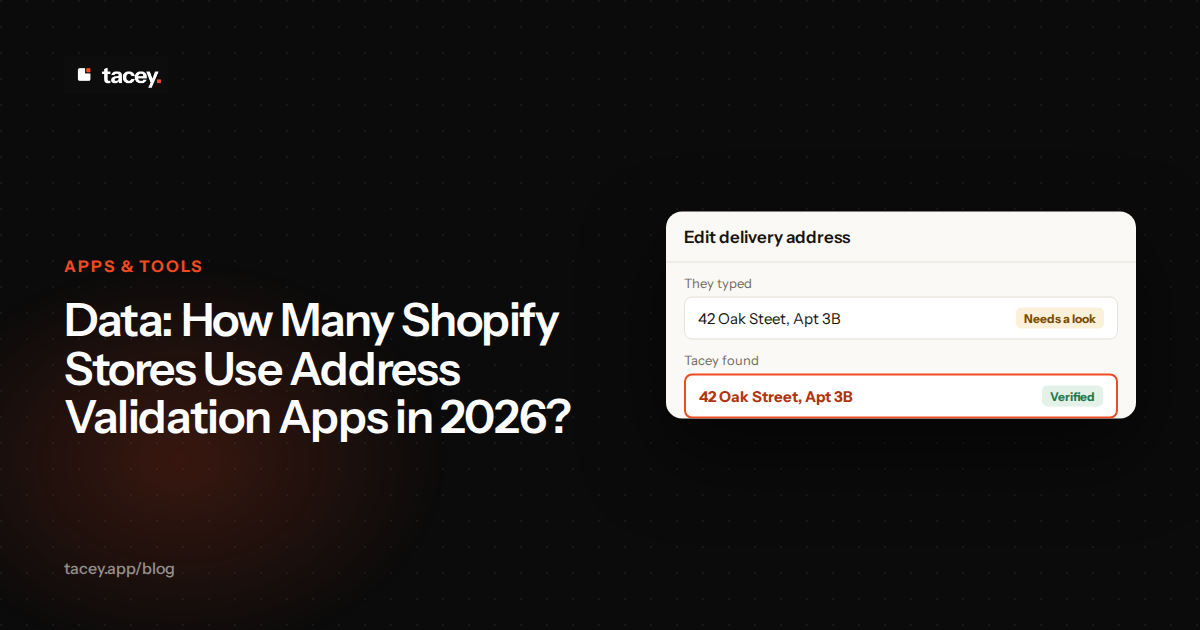
A surprising number of Shopify stores operate without a dedicated address validation app, relying on customers to get it right. While dozens of specialized tools exist, our analysis of public App Store data suggests that a significant portion of merchants either forego validation or get it as part of a larger toolkit. This gap contributes directly to failed deliveries and avoidable customer support costs.
How many dedicated address validation apps are on the Shopify App Store?
As of late 2026, the Shopify App Store lists several dozen apps whose primary function is address validation. The exact number fluctuates as new apps launch and older ones are delisted. However, a core group of about 10 to 15 apps command the majority of reviews and, by extension, the market's attention.
These apps range from simple validators that check addresses against postal databases to more complex tools that suggest corrections in real-time. The key distinction is that these are standalone products, sold and installed specifically to solve the problem of inaccurate addresses entered by customers.
Many more apps, however, include address validation as a secondary feature within a broader suite of tools for order management or shipping. This makes a simple count of "address validation apps" a bit misleading, as many merchants have this capability without having installed a dedicated app for it.
What is the combined number of installs for the top address validation apps?
Shopify does not publish install counts, but public review data offers a proxy for market size. While a handful of the most popular dedicated apps have accumulated thousands of reviews combined, this only represents a fraction of the market. This figure suggests a user base in the tens of thousands for the most visible tools alone.
Counting installs is complicated because many merchants get validation from bundled app suites rather than standalone tools. These merchants have the capability but don't show up in the statistics for dedicated validation apps. Therefore, any analysis based only on apps in the "address validation" category will inherently undercount the total number of stores with this protection.
It's also important to view review counts critically. A new app might offer incentives to drive early installs but will have few reviews, understating its initial traction. Conversely, an older, established app may have many legacy reviews but slowing growth. Review count is a helpful signal of market presence over time, but not a perfect measure of an app's current install base or quality.
What is the average price for a standalone address validation app?
The pricing for standalone Shopify address validation apps typically falls between $5 and $30 per month for entry-level plans. Many apps offer a free plan with a limited number of address lookups, designed to let merchants test the service. More advanced plans can exceed $100 per month for high-volume stores.
Pricing models vary significantly. Some apps, like Clearer.io, offer tiered monthly subscriptions based on order volume. Others, like Ninja Address Validation, use a pay-as-you-go model where you purchase credits for validations. This variety allows merchants to choose a plan that aligns with their order flow and budget.
Worked example: Comparing pricing models
Imagine your store processes 800 orders per month. App A offers a tiered plan at $29 for up to 1,000 orders. Your cost is a flat $29. This provides predictable billing, which many merchants prefer for budgeting. The effective cost per validation is just under four cents.
Now consider App B, which uses a pay-as-you-go model at $0.05 per validation. For the same 800 orders, your cost would be $40 per month (800 x $0.05). In this case, the tiered plan is cheaper. However, during a slow month with only 400 orders, App B would only cost you $20, while App A would still be $29.
This choice represents a trade-off between predictability and direct cost-efficiency. A store with stable, high volume often benefits from a subscription tier. A new store with fluctuating or low volume might save money with a pay-as-you-go model, even if the per-unit cost seems higher at first glance.
It is important to read the details of each pricing plan. Some may cap the number of validations per month, while others might charge extra for international address checks. The true cost depends on your store's specific needs, order volume, and whether your customers are primarily domestic or international.
How do the features of top validator apps like Clearer.io and Ninja Address Validation compare?
Most top-tier address validation apps offer a similar core feature set: they check customer-entered addresses against official databases and prompt the user to fix errors. However, there are differences in implementation, user experience, and advanced features. Below is a comparison based on their listed capabilities.
Both Clearer.io and Ninja Address Validation are designed to catch errors before they become shipping problems. They integrate with the Shopify checkout process to provide real-time feedback to the customer. This is a common approach for dedicated validation apps.
The trade-off: Friction vs. Certainty
Merchants face a classic trade-off between checkout friction and address certainty. Every pop-up or correction request adds a small amount of friction that interrupts the customer's flow. In rare cases, this interruption could cause a highly sensitive shopper to abandon their purchase. This is the primary argument against overly aggressive, in-checkout validation.
On the other hand, allowing an unverified address to pass through simply defers the problem. The friction is gone from the checkout, but it reappears later as a failed delivery and a costly support ticket. Certainty at checkout costs a little friction; a lack of certainty creates much larger operational costs down the line.
The concrete step is to test the intrusiveness of your validation. Does it appear for every order, or only when it detects a likely error? Can you customize the message to be less alarming? A message like, "Is this correct?" is less jarring than a red-bordered "INVALID ADDRESS" warning that might scare a customer away.
The main differences often lie in the design of the pop-up or prompt, the level of customization available to the merchant, and how they handle ambiguous cases like missing apartment numbers. Some apps will block an order with a bad address, while others simply flag it for review.
The moment an order is placed is the start of the post-purchase experience, not the end of the sale. A wrong address is the first and most common failure in that experience.
Why do so many stores still ship to bad addresses despite these apps?
Even with validation apps, shipping errors from bad addresses persist for several structural reasons. The most common issue is the unit or apartment number. A validation app can confirm that "123 Main Street" is a valid building, but it often cannot confirm if Apartment 4B exists or if the customer forgot to include it.
Browser autofill is another major source of errors. Customers often save their address in their browser, and if it contains a typo or is outdated, that incorrect information is automatically populated at checkout. Many shoppers click through without double-checking the pre-filled fields, bypassing the validation app's checks if the error is subtle.
This problem is worse when the autofilled address is a previous residence. The address is technically valid, it exists and passes a database check, but it's the wrong destination for the current order. The validation app sees a real address and approves it, creating a delivery failure that is nearly impossible for software to prevent pre-shipment without customer intervention.
Another edge case is carrier-specific limitations. An address may be 100% valid according to postal databases, but a specific carrier like FedEx or DHL might not service it, preferring a street address over a PO Box, for example. The validation app gives a green light, but the fulfillment process still fails. This is a logistics problem, not just a data problem.
Finally, some validation apps can be too permissive or too strict. An overly aggressive validator might frustrate international customers or reject valid but unusual addresses. A lenient one might allow typos and formatting errors to slip through. Finding the right balance is a constant challenge for merchants.
What is the difference between checkout validation and post-purchase validation?
Checkout validation happens during the checkout process, before the customer pays. These apps use Shopify's checkout extensions to interrupt the flow and ask the customer to confirm or correct their address. The goal is to fix the address before the order is created. This is the model used by most standalone validator apps.
This approach has technical considerations. Checkout UI Extensions run in a secure sandbox, which limits what they can do to ensure security and performance. For example, merchants can only add a few extensions to any given part of the checkout. For many stores, this is a powerful way to prevent errors, but it does add a step to the payment process.
Post-purchase validation, conversely, happens after the customer has paid, on the order confirmation or order status page. This approach avoids any friction or potential cart abandonment during the critical checkout phase. The order is secured first, and then the address is verified.
Shopify itself performs some basic address validation on orders after they are placed, tagging those with potential issues. A post-purchase validation model builds on this, giving the customer a chance to fix their own mistake on the order status page, reducing the burden on the merchant's support team.
How many merchants get address validation as part of a larger toolkit?
A significant and growing number of merchants get address validation not as a standalone app, but as an integrated feature within a larger order management platform. This is a strategic choice to reduce "app sprawl, " the complexity and cost of managing dozens of individual Shopify apps.
This app sprawl has hidden operational costs. Each new app is another dashboard to check, another set of credentials to manage, and another bill to pay. More importantly, each app can have its own performance impact, potentially slowing down your site. They can also conflict with one another, creating bugs that are difficult to diagnose.
Platforms that offer post-purchase order editing, customer self-service cancellations, or post-purchase upsells often include address validation as a foundational feature. It makes sense: if a customer is on their order status page to add an item or check their order, it's the perfect time to ask them to confirm their shipping details.
By bundling validation into a post-purchase suite, you solve for these issues. The validation is triggered by the same system that handles order edits or upsells. This means no app conflicts, one performance signature, and a single, unified interface for the customer on their order status page. This approach integrates a reactive chore into the natural flow of the post-purchase experience.
This is the model Tacey uses. We believe that address validation shouldn't be a separate, single-purpose tool you have to buy and configure. It's a fundamental part of a healthy post-purchase workflow. That's why international address validation is included on every Tacey plan, checking every order your plan covers as it lands to help prevent costly shipping errors.
What is the ROI of preventing a single failed delivery?
Preventing a single failed delivery provides a substantial return on investment. The direct financial loss alone includes the product, original shipping, and reshipping costs. A $50 product with $10 shipping can quickly become a $70 loss, before accounting for support time.
Let's break down that loss more precisely. The original shipping fee of $10 is gone. If the carrier charges a return-to-sender fee, that could be another $17. Reshipping the correct product costs another $10. Your direct loss on shipping alone is now $37, not including the cost of the product itself or the time spent fixing it.
Beyond the direct costs, there's the operational expense. Your customer support team has to spend time handling the "where is my order?" (WISMO) ticket, investigating the tracking, communicating with the customer, and processing the reshipment. If a support agent costs $30 per hour and spends 20 minutes on the ticket, that's another $10 in payroll spent on one avoidable error.
Finally, there's the hidden but most significant cost: customer dissatisfaction. A failed delivery is a poor experience that can erode trust and reduce the likelihood of a repeat purchase. The unhappy customer might leave a one-star review, deterring future buyers. You also risk a chargeback for non-delivery, which comes with its own fees and can harm your standing with payment processors.
Ultimately, whether you choose a dedicated app or an integrated solution, address validation is not a cost center but a profit protector. Tacey provides this protection as part of a complete post-purchase toolkit, allowing your customers to fix their own address errors on the order status page. You can learn more about our approach to address validation or install Tacey from the Shopify App Store and start catching errors today.
Frequently asked questions
Can a Shopify address validator check for apartment numbers?
Most address validators can confirm if a street address is valid but struggle to verify specific unit or apartment numbers. They can flag an address that is known to be a multi-unit dwelling but is missing a unit number, prompting the customer to add it.
Do address validation apps work for international orders?
Yes, most modern address validation apps support international address formats. However, the quality and completeness of international postal data can vary by country. It's important to check an app's specific country coverage if you have a large international customer base.
Will an address validator slow down my checkout?
Apps that run during checkout can add a small delay, as they have to make a call to an external service. Most are highly optimized to be nearly instantaneous, but it is a potential source of friction. Post-purchase validation, which runs after payment, has no impact on checkout speed.
What is the difference between address validation and address verification?
Though often used interchangeably, validation typically refers to formatting an address to meet postal standards (e.g., standardizing "St." to "Street"). Verification confirms that the address actually exists and can receive mail. Most Shopify apps perform both functions.
Can I turn off address validation for certain customers?
This depends on the specific app's features. Some advanced apps may allow you to create rules to bypass validation for certain customer tags or order types, but this is not a standard feature. Validating addresses where possible is a common strategy to reduce shipping risk.
Does Shopify have a built-in address validator?
Yes, Shopify has a basic, built-in system that flags orders with addresses it suspects may be invalid. It adds a "shipping address may not be valid" warning to the order in the admin, but it does not correct the address or prompt the customer to fix it. Third-party apps provide a more comprehensive and interactive solution.
How do I handle an address that fails validation but the customer insists is correct?
This situation requires manual review. You can use a tool like Google Maps to view the location or contact the customer directly to confirm the details. Sometimes, new constructions or rural addresses are not yet in postal databases, and the customer is indeed correct.
 Install on Shopify