 tacey
tacey Install on Shopify
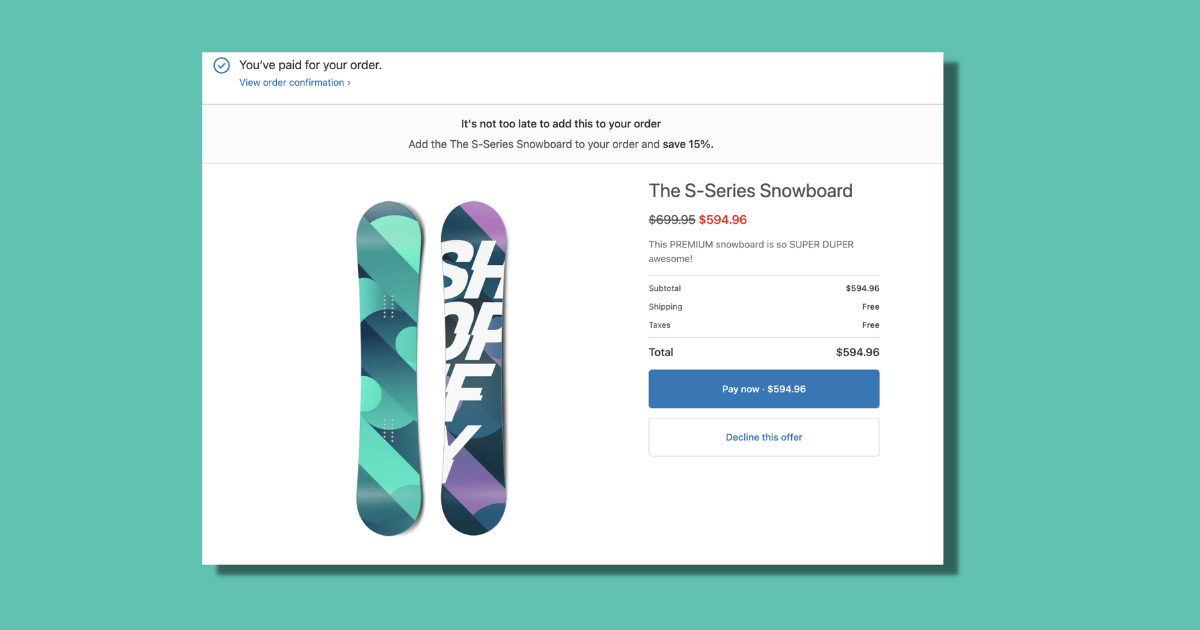
The order confirmation email is the highest-opened email a Shopify merchant will ever send. Klaviyo's 2024 Email Benchmarks put the average open rate for post-purchase transactional emails at 55 to 65%, compared to 20 to 25% for promotional campaigns. The customer is engaged, the transaction is fresh, and the brand has earned a level of attention it will not receive again until the next purchase.
Most merchants use that moment to send a receipt. The merchants who understand what post-purchase email can do use it to make the next sale before the customer has a chance to forget they bought from you.
This article covers the full post-purchase email sequence: confirmation, shipping, delivery, review request, and cross-sell. For each stage, we will explore what to write, when to send it, and what common mistakes reduce effectiveness.
Why are post-purchase emails more effective than marketing campaigns?
Post-purchase emails have much higher engagement because the customer expects them. Open rates are 55-65% compared to 20-25% for promotions. Their high deliverability and the customer's recent purchase create the most efficient context for communication a merchant has.
Promotional emails compete for attention in a crowded inbox. The customer scans the subject line and decides if the offer is worth their time. Usually, it is not. Average open rates for e-commerce promotions are about 20 to 25%, with click-through rates around 2 to 3%, according to Klaviyo's 2024 data.
Post-purchase emails arrive when the customer is already thinking about your brand. They just bought something and are highly engaged. Open rates reflect this, reaching 55 to 65% for confirmation and shipping emails. Even follow-up emails see open rates of 40 to 50% without any special optimization.
Furthermore, these emails have the highest deliverability. Spam filters recognize them as expected transactional messages. Inbox placement rates often exceed 98%. In contrast, promotional email deliverability can fall below 85% for some senders, as noted in Validity's 2024 Email Deliverability Report. This makes the post-purchase channel too valuable to use for just a receipt.
What should my order confirmation email include besides a receipt?
Beyond the receipt, include a human note from the founder, a useful tip for the product just purchased, and a simple referral prompt. This builds a connection without feeling like an aggressive upsell, which you should avoid at this stage.
The confirmation email is read by most of your customers. It is the single email where you have the highest probability of being seen. Everything you include here reaches an audience your promotional emails will never fully match.
Three elements that convert without feeling promotional:
- A human founder or team note. A single sentence, signed by a real person: "Made this myself. Hope it does exactly what you need it to." This costs nothing and transforms the email from a receipt into a moment of brand connection.
- A product care or use tip. One specific, genuinely useful piece of information about the product they just bought. This positions your brand as an expert and gives the customer a reason to open your next email.
- A low-friction referral prompt. A simple sentence: "If you know someone who would love this, they can find us at [yourstore.com]." No reward is needed. The conversion rate is low, but the cost is zero.
What to avoid in the confirmation email:
- Upsell banners for other products. They just completed a purchase, and this can feel aggressive.
- Discount codes for future purchases. It is too early. Save this for the delivery confirmation stage.
- Long copy. The customer is here to confirm their order, not read content. Keep it brief.
How can I improve my shipping notification email?
Make it more useful by providing a specific estimated delivery window, not just a tracking link. Add details on what to expect upon delivery, like packaging notes. This reduces support questions and builds anticipation for the product's arrival.
The shipping notification is the second moment of peak engagement. The customer is anticipating delivery and wants to know the status of their order. This is the email they will open most quickly after it lands. The open rate benchmark is 55 to 65% (Klaviyo, 2024).
What to add to the shipping notification:
- A specific estimated delivery window. Instead of "Click here to track," say "Your order is on its way and should arrive between [date] and [date]." Specificity reduces "where is my order" support tickets.
- What to expect on delivery. Share packaging information or special handling notes. This is useful information that reduces post-delivery questions about packaging and condition.
- A gentle anticipation builder. Use a single sentence about the product's benefit, written as if they already have it: "Soon you will have X that does Y." This primes them for a positive delivery experience.
Never include a "you might also like" product recommendation in this email. The customer is in logistics mode, not shopping mode. Recommendations here feel like clutter and can lower open rates on future emails.
What should I send after an order is delivered?
Send a confirmation 24 hours after delivery. Use it to share a helpful tip, ask for a review, and make a relevant cross-sell recommendation. This is the best time to drive a second purchase or get a review, with open rates around 40 to 50%.
Waiting 24 hours gives the customer time to receive, open, and begin using the product. Sending the email immediately upon a "delivered" status update can create a mismatch if they have not retrieved the package yet.
Structure for a high-leverage delivery confirmation:
- Confirm delivery with a human voice. "Your order should be with you now. Hope it is everything you were expecting."
- The helpful tip or how-to. Offer guidance on getting the most value from the product now that they have it. This builds the authority that makes your next recommendation credible.
- The review ask. Keep it soft and low-friction. "If you have a moment, we would love to hear what you think. One sentence is plenty." Link directly to your review platform like Google Reviews, Trustpilot, or Okendo.
- The first cross-sell, earned by context. Recommend one product that genuinely extends what they already have. A customer who bought hiking boots is a candidate for trail socks, not a waterproof jacket.
- A discount code for the next order. If your margin supports it, offer 10 to 15% off, time-limited to 14 days. According to a study by the Wharton School, this can create a stronger purchasing habit.
Should I send another email a week after delivery?
Yes, a 7-day follow-up serves as a final reminder for any discount codes and as a second, reframed request for a product review. Customers who leave reviews convert at a much higher rate on their second purchase, making this email valuable.
Yotpo's 2024 Customer Loyalty Report found that customers who leave reviews convert on their second purchase at a 3x higher rate. The act of writing a review creates engagement that increases the probability of returning. This makes the second ask worthwhile, even with a lower response rate.
Structure of the 7-day follow-up:
- Brief, human check-in: "Hope [product] is doing its job. It is one of our favourites."
- Reminder that the discount code expires in 7 days, with the code restated in the email.
- Second review ask, reframed: "If you have used [product] and have a minute, a quick review helps other people decide."
- An optional, different cross-sell recommendation if the first one generated no clicks.
This email should not look like a promotional campaign. It should read like a personal follow-up. This format consistently outperforms visually elaborate emails sent at the same stage, per Litmus's 2024 benchmarks.
How do I win back customers who don't buy again?
Send a targeted win-back email 30 days after delivery, but only to relevant customer segments. Personalize it by referencing their first purchase and offer a clear reason to return. Avoid sending it to customers with long natural repurchase cycles.
A 30-day gap is not unusual for all product types. A customer who buys a large bag of coffee beans may not need more for weeks. This email is for categories where a 30-day gap signals a potential drift. For the right segments, it can recover a meaningful percentage of customers.
Klaviyo's data shows personalized win-back emails achieve open rates 40% higher than generic ones. The investment in setting up personalization logic in platforms like Klaviyo, Omnisend, or Shopify Email pays for itself in higher response rates.
Be careful with segmentation. Sending a win-back email to a customer who bought a mattress 30 days ago will feel like spam. This can erode the goodwill you built. Segment by product category and expected repurchase window to avoid this.
Which email platform is best for Shopify post-purchase sequences?
Klaviyo is the most powerful for complex segmentation. Omnisend is a strong, intuitive alternative with good SMS integration. Shopify Email is a simple, free starting point for new merchants before their needs justify a more advanced tool.
| Platform | Best For | Notes |
|---|---|---|
| Klaviyo | Merchants with 200+ orders/month needing complex segmentation and A/B testing. | Pricing is based on subscriber count. Native Shopify integration passes data in real time. |
| Omnisend | Merchants wanting an intuitive interface and tight email/SMS campaign integration. | Features a straightforward automation builder and competitive pricing. |
| Shopify Email | New merchants starting their post-purchase program. | Included with Shopify plans (up to 10,000 emails/month). Simple but has limited automation triggers. |
What subject lines get the best open rates for post-purchase emails?
Specificity is key. Use the product name instead of just "your order." Questions work well for delivery confirmations, like "Did everything arrive okay?". Avoid promotional words like "deal" or "discount," as they can hurt open rates for transactional emails.
- Specificity outperforms vagueness. "Your [product name] is on its way" gets an 18% higher open rate than "Your order has shipped" (Mailchimp, 2024).
- First names in subject lines add about 6% to open rates in this context.
- Questions in delivery confirmations like "Did everything arrive okay?" perform 12% better than statements like "Your order has been delivered" (Litmus, 2024).
- Avoid promotional language. Words like "deal" or "save" reduce open rates by about 8% in transactional emails (Validity, 2024).
How do I avoid annoying repeat customers with too many emails?
Use suppression logic in your email platform. Always send order and shipping confirmations. For repeat buyers, adjust the delivery confirmation copy, suppress review asks if they have already left one, and turn off follow-ups if they have already made another purchase.
A full sequence can be five touchpoints over 35 days. For frequent buyers, this becomes repetitive. The correct logic is:
- Confirmation and shipping notifications: Send for every order.
- Delivery confirmation: Send for every order, but adjust copy for repeat buyers.
- Review ask: Only send if the customer has not already left a review.
- 7-day follow-up and cross-sell: Suppress for customers who have already made a second purchase.
- 30-day win-back: Suppress for customers who are within their natural repurchase window.
Most email platforms handle this logic with segments and conditions. Setting this up correctly prevents your sequence from feeling repetitive to your most loyal customers.
Frequently asked questions
When is the best time to ask for a product review?
The best time is in the delivery confirmation email, sent 24 hours after the product arrives. The customer has had time to use the product and form an opinion. A second, gentler ask can be made in a 7-day follow-up email if they did not respond to the first.
Should I offer a discount in my order confirmation email?
No, it is too early. Offering a discount immediately after a purchase can feel aggressive. Save the discount code for the delivery confirmation email, when the customer has received their product and is in a positive state of mind.
Why wait 24 hours to send a delivery confirmation?
Waiting 24 hours after the carrier marks an order as "delivered" prevents a mismatch experience. It gives the customer time to physically retrieve the package and open it. Sending the email instantly can lead to confusion if they have not seen the package yet.
How much does personalization matter in a win-back email?
Personalization is critical. Win-back emails that reference the specific product a customer purchased have open rates up to 40% higher than generic campaigns. This context shows you remember their order and makes the message far more relevant.
What is the biggest mistake in a shipping notification email?
The biggest mistake is including product recommendations like "you might also like." At this stage, the customer is focused on logistics and tracking their package, not shopping. These recommendations feel like clutter and can reduce the email's perceived value.
Do customers who write reviews buy more?
Yes, data shows a strong correlation. Customers who leave a review convert on their second purchase at a rate three times higher than customers who do not. The act of writing a review strengthens their cognitive engagement with your brand.
 Install on Shopify