tacey
 Install on Shopify

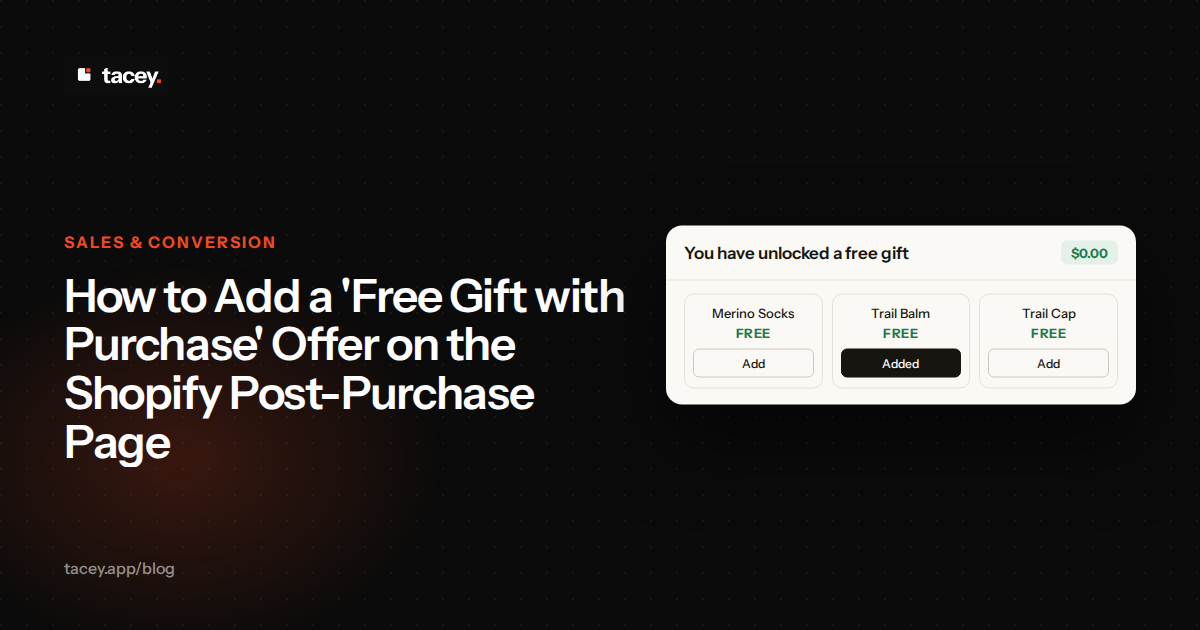
A Shopify free gift with purchase offer works best after the customer has paid, on the order page they already check. Tacey's Free gift tool shows a carousel of gift products on the thank you and order status pages, and the customer adds one with a single click. This guide covers why the offer belongs after payment, how to set it up, and what it changes in fulfillment.
Why offer a free gift after purchase instead of at checkout?
Because the customer has already decided to buy, so a gift shown after payment adds to the order without asking them to change their mind at checkout. Nothing Tacey does runs during checkout. Everything happens after payment, on the order pages Shopify already shows.
Checkout is a fragile step. Every extra choice put in front of a shopper is a chance for them to leave. A gift that appears on the order status page never sits in that path, because the payment has already gone through.
Here is how the cost works, without a precise figure. A gift shown at checkout gives a shopper one more choice in the step where they are most likely to stop. Even a small rise in hesitation, repeated across many orders, adds up, because every lost order is a sale that never closed. A gift shown after payment cannot cause that loss, because the sale is already closed.
The trade-off is real. A shopper who wants the gift before paying cannot get it at that point, and a customer who never reopens the order status page never sees the offer. For those customers the gift is an extra, not a reason to buy, so the offer has to be easy to notice when they do come back.
One edge case breaks the simple advice. The gift travels with the order, so it ships to the same address. A buyer sending a present may not want an extra item going to the recipient unannounced, so this shopper may skip the offer. That is a fair result, not a failure.
A gift that appears after the customer has paid reads as thanks, not as a sales pitch. Keep it that way.
Can you add a free gift to a completed Shopify order?
Yes. After payment, a customer opens their order status page, picks one gift from the carousel, and adds it to the existing order with one click. No second order is placed, so the gift travels with the order they already paid for.
That matters for the customer and for you. One order means one payment record, one set of order notes and one fulfillment line for the gift to join. For the wider mechanics of adding an item to a paid order, search the Tacey blog for guides on changing paid orders.
Setting the offer up takes a few minutes. The tool is on by default, so most of the work is choosing the products. Follow these steps:
- In your Shopify admin, open Apps, then choose Tacey.
- In Tacey's left menu, click Tools. Find Free gift in the list. It is on by default and shows on the thank you and order status pages. Confirm the switch is on.
- Choose the products you want in the carousel. Pick items that are in stock and that you can pack for every order.
- In Shopify admin, open Orders, place a test order, then open its order status page. You should see the carousel, and you should be able to add one gift to the test order.
Run the test on a phone as well as a desktop. Many customers reach the order status page from a link in an email or a text message, and that link often opens on a phone. If the carousel is hard to tap there, the offer is hard to use, however good the gift is.
If the carousel does not appear, check the Tools page first. Tacey's Home and Tools pages show a warning that names the page when the Tacey editing tools block goes missing, for example after an edit to your checkout. Fix that block before you test again.
What a broken offer costs
Say a gift runs out of stock but stays in the carousel. A customer picks it, and you cannot pack it. You must then ship without the gift and apologize, or hold the order. Every customer who picks that gift after the stock is gone is left short, and the problem grows with the number of orders that reach the carousel.
The fix is quick, but only if you catch the gap early. Before each weekly stock check, compare the gift's on-hand count with the orders you expect that week. If the count is lower, remove the gift from the list until new stock arrives. Waiting until a packer finds the gap costs far more.
How do you set rules for who is eligible for a free gift?
You set the gift list, not the rules. The Free gift tool shows the products you choose in its carousel. The product details this guide is built on do not describe order-value thresholds or customer-level targeting, so do not promise one to customers yet.
A single shared list has a clear benefit. Every customer who sees the order status page gets the same choice, so no one wonders why a neighbor received a better gift. It also keeps the offer simple to explain in an email or a support reply.
The cost is that a repeat buyer sees the same list every time. If you sell a consumable, a loyal customer may pick the same item on every order. That is fine for a sample, but it can make the offer feel stale to the customers you most want to keep.
If you want a rule such as a minimum spend, confirm the tool does it before you write the rule into your marketing. A promise the page cannot keep costs more trust than the gift earns. Ask Tacey support or check the Tools page before you announce it.
In the meantime, a short and consistent list of low-cost items does most of the work. Keep the list the same for a few weeks, so you can see which gift customers pick and whether the offer is worth its cost.
How to tell if your list is working
Count gift picks as a share of your orders over a few weeks. A healthy share depends on your store, but a list that gets almost no picks is a list customers do not want. Swap out the weakest item, keep the rest, and count again. Changing everything at once makes the result impossible to read.
What are the best types of products to offer as free gifts?
Pick products that cost you little to send and that a customer would be glad to receive. Small consumables, samples and companion items usually fit, because they look generous and pack easily. A gift does not need to be expensive to feel like a gift, only useful and relevant.
Every gift still costs you something. It has to be in stock when the order is picked, and it takes packing time and packaging. Those costs repeat on every order that picks the gift, so a gift that is popular can cost more than it first appears.
A gift that looks cheap to the customer does little for the offer. A gift that is expensive for you turns the offer into a discount you pay for on every order. The middle ground is a product that looks worth more than it costs you to send.
Compare the costs in plain terms. A percentage discount takes its cost from every order's total, whatever that order is worth. A gift costs roughly what you pay for it, plus packaging and the minutes a packer spends on it. Add those up for the item you have in mind, and compare the total with the discount you would otherwise give.
The strongest picks usually relate to what the customer bought. A traveler who bought a bag may like a small travel accessory. A customer who bought a skincare set may like a sample of a related product. The link to the original purchase is what makes the gift feel chosen.
Watch shelf life. A sample with a short expiry date can go out of date in your warehouse before anyone picks it. Check dates when you load the carousel, and remove any item that will expire within a few months. An expired sample sent as a gift does more harm than no gift at all.
How does adding a free gift affect the order's fulfillment?
The gift goes into the fulfillment queue with the rest of the order, so it is picked and shipped along with the items the customer already bought. A Free gift is added at no charge. On an order that ships to another country, Shopify can add an import duty when the gift is added, and then the order owes that amount.
A free gift does not place a fulfillment hold. If an import duty is added to a gift on an order that ships to another country, the order owes that amount, and Tacey tags the order as owing money and tells you, instead of holding it. A change that costs the customer more, such as a paid add-on, is different: Tacey places a fulfillment hold on the order while that money is owed, and that hold is always on. You can also switch on a second hold, which is off by default: after a customer changes an order's address, Tacey holds that order's fulfillment until the edit window closes, even when nothing is owed.
Customer changes happen inside the edit window you set, and you can switch on a setting that, after a customer changes an order's address, holds fulfillment until that window closes. Once everything on an order has shipped, the customer can no longer change the items already on it or its address. A customer who opens the order status page after the window has closed cannot add a gift to that order.
The window itself is a trade-off. A longer window gives more customers time to add a gift. It also keeps your packers waiting longer before they can start. A shorter window gets orders out faster but gives fewer people a chance to pick the offer.
Here is how the timing plays out. Suppose your packers print the day's pick list at a fixed time, and your edit window stays open past that print. A customer who adds a gift after the print misses the batch, so that order waits for the next one and ships a day late. Closing the window before the print run prevents this.
Before you turn the offer on, ask your warehouse how a gift should appear on the pick list. A gift with its own line is easy to pick and count. A gift hidden inside an order note is easy to miss, and a missed gift is a customer who got less than they were promised.
Set the timing with the warehouse too. If your team prints pick lists in batches, the edit window must close before that print run. Otherwise a gift can be added after the list is printed, and it will sit unpicked until someone checks the order by hand.
Can customers choose their free gift from a selection of items?
Yes. The carousel shows the products you chose, and the customer picks one with a single click. Choice makes the gift feel like something the customer selected for themselves, not something the store sent without asking.
Choice has a cost on your side. Each product you offer is a product you must stock, photograph, pack and reorder. Fewer options are easier to manage, and they are also quicker for the customer to read.
A customer who has just paid is not looking for a long shopping session. Three or four clear options usually read faster than a long grid. The customer can decide in a few seconds, and the page stays easy to scan on a phone.
The rule has one exception. If your gift comes in sizes or shades, each variant needs its own stock count in your warehouse, so four products can quietly become many more things to pack. Count the variants before you load the carousel, not after a packer asks which one to send.
Label each option plainly, with the product name and what it is for. A label that makes the customer guess what they are getting is a label that gets skipped. A clear label gives the customer a reason to click, which is the whole point of the carousel.
Look at the picks after a month. Suppose one product takes most of the picks across the carousel. That product is your real offer, so keep it well stocked. The weaker items share the rest, and the weakest of them is the first candidate to replace.
Some customers will pick nothing, and that is normal. Do not judge the offer by how many customers take a gift alone. Judge it by whether gift orders are packed correctly and whether customers come back to buy again.
Does this method work on all Shopify plans?
Yes. Every Tacey tool is on every plan, and plans differ only by how many orders they cover each month. The Free gift tool is not held back for a higher tier, so the question is how many orders your store places, not which features you need.
Tacey Starter is $29 a month or $290 a year and covers 750 orders a month. Tacey Growth is $49 a month or $490 a year and covers 1,500 orders a month. The full list of plans and caps is on the pricing page, and every plan starts with a 14-day free trial. There is no free plan after that trial.
Take a store that places more orders in a month than Starter covers. It would need Growth, which covers 1,500 orders a month. Paying yearly saves money on either plan. On Growth, the yearly price is less than twelve monthly payments.
Choose the yearly price only after the trial. A yearly plan saves money, but it ties you to a full year. Use the 14-day free trial to place real test orders, check the carousel, and confirm the gift reaches your pick list before you commit.
The same post-purchase page can also carry a paid option. Recommended for you works differently from a free gift. A customer who picks a product that costs more pays the difference through Shopify's own payment link before the order ships, while a free gift is added at no charge. To see how paid add-ons sit beside gifts, look at Tacey's upsells page, then install Tacey on the Shopify App Store and turn on Free gift this week.
Frequently asked questions
Does the free gift cost my customer anything?
Not normally. A Free gift is added at no charge. On an order that ships to another country, Shopify can add an import duty when the gift is added, and then the order owes that amount. The paid options on the same page, such as Recommended for you, can cost the customer more.
Can a customer add a gift after the order has shipped?
Only while the edit window you set is open. By default a customer can still add a gift after everything on the order has shipped, and it goes out as a second parcel, unless you switch that off.
Does the gift offer run during checkout?
No. Nothing Tacey does runs during checkout. The carousel appears after payment, on the thank you and order status pages.
Is the free gift tool switched on by default?
Yes. Free gift is on by default on the thank you and order status pages. Check the Tools page to confirm the switch and choose your products before you rely on it.
What is the difference between a free gift and Recommended for you?
A free gift is added at no charge. Recommended for you can cost the customer more, and they pay the difference through Shopify's own payment link before the order ships.
Will a gift hold my order from fulfillment?
Not on its own. A free gift does not place a fulfillment hold. If an import duty is added on an order that ships to another country, Tacey tags the order as owing money and still does not hold it. Tacey does place a fulfillment hold while a paid add-on or another change owes money, and that hold is always on. The optional hold, which is off by default, is placed after a customer changes the order's address, not after a gift is added.
Should I offer more than one gift?
Usually yes, but keep the list short. Three or four options cover most tastes without creating stock work you cannot keep up with. Add more only after you can see which items customers actually pick.
 Install on Shopify