tacey
 Install on Shopify

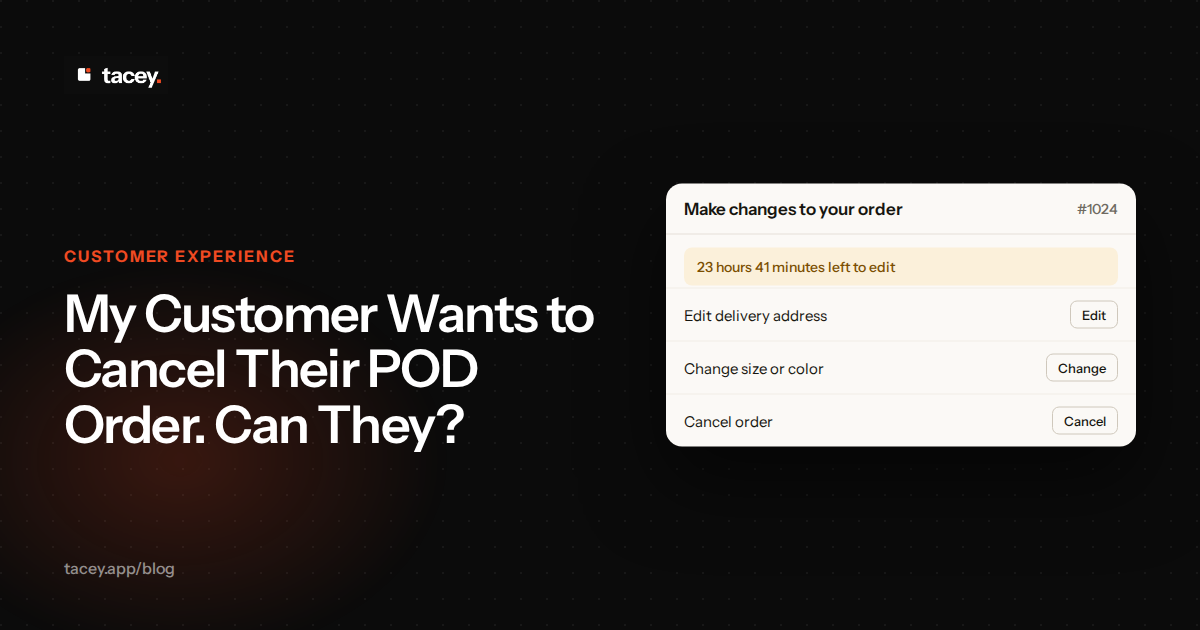
Yes, a customer can cancel a print-on-demand order, but only within a very short window. This period is often just a few hours after the order is placed. Once the item is sent to the printing provider and enters production, it is typically too late to cancel.
What is the cancellation window for a typical print-on-demand order?
The cancellation window for a print-on-demand (POD) order is usually between two and eight hours. This is not a policy set by you, but a technical limit imposed by your POD supplier. Many suppliers automate their workflow, so orders are sent for printing very quickly after payment.
POD suppliers group individual orders into large batches for printing. This is how they keep costs low. Your single t-shirt order is printed alongside hundreds of others. Once it joins a batch and is scheduled on a machine, pulling it out is not practical. This batching process is what makes the cancellation window so brief.
The exact window depends entirely on your fulfillment partner. Some may offer a slightly longer grace period, while others might push an order into their production queue almost instantly. Check your supplier's service level agreement to know your exact cutoff time.
At what point in the process is it too late to cancel an order?
It is too late to cancel a print-on-demand order once its status changes to "In production" or a similar state in your supplier's dashboard. This status means the physical product is being made, and the costs of materials and labor have been committed.
The Lifecycle of a POD Order
An order moves through several automated statuses in minutes. It starts as "Pending" or "On Hold" in your supplier's system. This is your only chance to act. Soon, it becomes "In Production," meaning the blank garment is picked and queued for printing. After that, it moves to "Shipped," at which point it is with the carrier.
This is the fundamental trade-off of the POD model. You hold no inventory, but you also have minimal control once fulfillment begins. This is why communicating the short cancellation window to your customers is so important for managing expectations.
The "On Hold" Status Edge Case
Sometimes an order is put "On Hold" by the supplier for a technical reason. This might be a low-resolution graphic or an invalid shipping address. This status also stops the clock on production. This gives you an unexpected, extended window to cancel the order while you resolve the underlying issue with your customer.
What a Late Cancellation Actually Costs
Consider the real numbers. A customer orders a custom hoodie for $50. Your production cost from the supplier is $28. If the customer cancels late, you cannot stop the order. The supplier still charges you the $28. You now have a choice: absorb the loss or enforce your policy on an unhappy customer.
This $28 is a sunk cost. It represents the direct financial hit from a single failed cancellation. If this happens even a few times a month, it erodes your profit margins. For a small store, these losses add up quickly and can impact the money available for marketing or new designs.
To put that $28 loss into perspective, consider your profit margin. If your average order profit is $12, you need more than two additional successful sales just to break even on one failed cancellation. This demonstrates how quickly these incidents can compound, turning a profitable day into a loss-making one without you realizing it.
How do you process a cancellation with Printify or Printful?
The process for canceling an order with major POD providers like Printify and Printful is similar and must be done before the order enters fulfillment. You will need to act quickly from your account with the provider, not from your Shopify admin.
How to Cancel on Printful
On Printful, navigate to the "Orders" section in your dashboard. Find the specific order you need to cancel. To the right of the order details, you will see a "Cancel order" button. If this button is visible and clickable, you are still within the cancellation window. The window is often just a few hours.
Once you click to cancel, Printful will ask for confirmation. After confirming, the order status will change to "Canceled." If the button is greyed out or missing, the order has already entered fulfillment. At this stage, their automated system has taken over, and cancellation is no longer possible through the dashboard.
How to Cancel on Printify
Printify is a network of different print providers, so the process has an extra layer. First, find the order in your "My Orders" tab in Printify. Click on it to see the details. You should see a "Cancel order" button at the bottom right. Click this if it is available.
Here is a critical edge case: the cancellation window can vary by the specific provider on Printify's network. A smaller provider might offer a slightly longer grace period than a larger, more automated one. Always check the status quickly. If you miss the window, you might try contacting Printify support, but success is not guaranteed.
If the "Cancel" button is gone, your only remaining option is to contact support directly. Use Printify's live chat for the fastest response. Immediately provide the order number and state you need an urgent cancellation. Acknowledge you might be too late. This rarely works, but if the order is stuck in a brief pre-production queue, a support agent can sometimes manually intervene.
Will you be charged by the POD provider if you cancel in time?
No, you will not be charged by your print-on-demand provider if you successfully cancel an order before it enters production. Canceling in time removes the order from the fulfillment queue before any costs are incurred by the supplier, so there is nothing to bill.
It's important to know when the charge happens. Most POD suppliers place a temporary hold on your payment method when an order syncs. However, they only capture the funds when the order status moves to "In Production." A successful cancellation voids this hold before capture. This is why a timely cancellation truly costs nothing; the money was never fully transferred.
Think of it as deleting an email before it sends. The action is reversed before it has any real-world consequence or cost. Once the cancellation is confirmed by the provider, you can then issue a full refund to your customer through your Shopify admin without having lost any money on the product itself.
Canceling with your POD supplier is only half the process. It does not automatically refund your customer in Shopify. You must complete this step manually in your Shopify admin. Go to the order, click "Refund," and ensure you select the correct amount to return to the customer's original payment method.
Also, be sure to restock the item when you process the Shopify refund. While POD means you have no physical inventory, checking this box keeps your sales data clean. It correctly logs that the sale did not proceed, which helps maintain accurate reporting on product performance and your store's overall cancellation rate.
How can you allow customers to cancel orders themselves on Shopify?
You can enable a native Shopify feature that allows customers to cancel their own orders, but it has strict limitations. A customer can only use this feature if their order is unfulfilled, their payment has not yet been captured, and the order does not contain a gift card.
The "payment not yet captured" rule in Shopify's native tool is a major hurdle for POD stores. Most merchants capture payment immediately. This is because you need the funds to pay your POD supplier for the product. Waiting to capture payment creates a cash flow problem and is not a viable option.
Manually handling each cancellation request adds up. A single support ticket can cost you several dollars in time and labor. If you get just five requests a day, that is time you are not spending on marketing or growth. An app that automates this process can pay for itself quickly by simply reducing your support load.
This is where third-party apps come in. An order editing app can offer a "Cancel order" button on the post-purchase order status page. This gives the customer a direct way to act, but only within a specific time window that you define, aligning with your POD supplier's cutoff.
The best customer experience is one the customer controls. Giving them a clear way to cancel within a safe window builds trust and reduces support tickets, while protecting your own margins.
What should your store's cancellation policy clearly state?
Your store's cancellation policy must be clear, concise, and easy for a customer to find before they purchase. It should set realistic expectations about the very limited time they have to act. Vague language can lead to customer frustration and disputes.
The cost of a vague policy goes beyond customer service emails. An unclear or hard-to-find policy is a primary driver of chargebacks. When a customer feels they were not properly informed, they are more likely to dispute the charge with their bank. This leads to an immediate loss of revenue, a chargeback fee, and a mark against your payment processor account.
Your policy needs to be impossible to miss. Do not bury it in a legal section that customers only visit when there is a problem. Place a short, clear summary of the cancellation window directly on your product pages. An FAQ accordion near the "Add to Cart" button is a perfect spot for this.
A Clear Policy Statement Example
Use direct and simple language in your policy. For example: "As our products are printed on demand just for you, we can only accept cancellation requests within 4 hours of your order. After this time, your order will have entered production and can no longer be changed or canceled. Please email us at [your email] to request a cancellation."
Your policy should also explain *why* the window is so short by mentioning that items are custom-printed on demand. Finally, it must tell the customer exactly how to submit a cancellation request. If they need to email you or use a contact form, provide clear instructions.
What happens if a customer wants to cancel after the item has gone to production?
If a customer requests a cancellation after the order has gone to production, you are generally responsible for the cost of the item. The POD supplier will charge you for the product and shipping, as their work is already complete or in progress.
In this situation, you have a few options. The first is to politely explain to the customer that the order is already being custom-made for them and cannot be canceled, referencing your store policy. This maintains your policy but may lead to an unhappy customer.
Calculating the Cost of Goodwill
Let’s break down the financial trade-off. A customer buys a t-shirt for $30. Your cost from the supplier is $15 for the shirt and $5 for shipping, totaling $20. Your initial profit is $10. The customer requests to cancel after the order is in production. You are already committed to paying that $20.
Option one is to enforce your policy. You keep the $30 payment and ship the shirt. Your profit remains $10, but you risk a chargeback and a negative review. A chargeback could cost you an additional $15 fee from Shopify Payments, turning your $10 profit into a $5 loss, plus a damaged reputation.
Option two is to offer a full refund as goodwill. You return the $30 to the customer. Since you still have to pay the $20 production cost, you have a net loss of $20 on the transaction. You have lost money, but you may have saved a customer relationship and avoided a public complaint.
A third way is a partial refund. You could refund 50%, giving back $15. The customer is partially satisfied, and you retain $15. This covers most of your $20 cost, resulting in a smaller net loss of $5. This compromise, or "goodwill deficit," often balances customer happiness with financial reality.
How can an order editing window reduce last-minute cancellation requests?
An order editing window can significantly reduce cancellation requests by addressing the root cause of many of them: simple mistakes. Customers often rush to cancel because they notice they chose the wrong size, entered an old address, or picked the wrong color.
Shipping address errors are one of the most frequent reasons for frantic post-purchase emails. Customers move, or their browser auto-fills an old address. Allowing them to fix this themselves on the order status page removes the panic. It turns a potential cancellation and re-order into a simple, self-managed correction.
This self-service ability changes the customer's emotional state from frustrated to empowered. Instead of feeling helpless and needing to contact support, they can solve their own problem instantly. This positive interaction builds trust and confidence in your brand, making them more likely to return in the future.
This approach turns a potential cancellation and a lost sale into a corrected, successful order. It reduces your customer support workload and prevents the frantic race against the POD supplier's clock. The customer feels empowered, and you secure the revenue.
Giving customers control within a defined, safe period is the most effective way to manage cancellations. By placing tools directly on the order status page, you can allow customers to resolve their own issues before the order is sent for printing. Tacey’s self-serve order editing tools, including a 'Cancel order' function, can be enabled to automate this process.
You set the time limit, and your customer gets the power to act, reducing friction and protecting your business from costly last-minute changes. You can try Tacey from the Shopify App Store to see how it fits your workflow.
Frequently asked questions
What is the difference between canceling and editing an order?
Canceling an order stops the transaction completely, and you refund the customer's money. Editing an order involves changing a detail, like the size, color, or shipping address, while the order itself remains active and proceeds to fulfillment.
Can I charge a cancellation fee for POD orders?
While you technically can, it is generally not recommended. The window for cancellation is so short that the order has not created significant administrative work. A fee can create a negative customer experience, which may cost more in the long run than the fee provides.
Does canceling an order hurt my store's analytics?
A canceled order will be recorded in your Shopify analytics. It directly impacts your "cancellation rate," and a rate consistently above 3% could be a red flag. It might indicate issues with your product descriptions, sizing charts, or checkout process. However, a few cancellations are a normal part of running an ecommerce business.
What if my POD supplier makes a mistake on an order I can't cancel?
If the supplier prints the wrong item, uses a flawed product, or the print quality is poor, you should not be held responsible. Reputable POD companies will typically offer a reprint or a refund for their errors. To file a claim, act fast, as most suppliers have a 30-day window. Take at least three clear photos: one showing the whole product, one of the defect up close, and one of the packing slip. Open a support ticket with your provider, attach the images, and explain the issue.
Should I offer store credit instead of a refund for cancellations?
Offering store credit can be a good strategy to retain revenue, but for a simple cancellation within the allowed window, a full refund is standard. Be careful with forcing store credit, as consumer protection laws in regions like the EU may require a refund to the original payment method for goods not yet produced.
 Install on Shopify