tacey
 Install on Shopify

Selling children's apparel on Shopify comes with a unique operational challenge: a high volume of exchanges for the wrong size. Parents are often guessing sizes for rapidly growing kids, leading to a cycle of returns that costs time, money, and customer goodwill. The solution is not a single fix but a strategy that combines preventing mistakes upfront with making them easy to correct after the sale.
This guide provides a step-by-step approach for Shopify merchants to diagnose the problem, reduce the frequency of size-related exchanges, and handle the ones that still happen more efficiently. From improving your product page to streamlining your post-purchase workflow, these actions can lower operational costs and improve the customer experience.
Why are return and exchange rates so high for children's clothing?
The return rate for kids' apparel is high because parents are buying for another person who is growing unpredictably. Unlike shopping for themselves, they rely on inconsistent brand sizing, age labels that don't match a child's actual size, and guesswork, especially when buying gifts. This uncertainty is a primary driver of exchanges.
Apparel in general has one of the highest return rates in ecommerce, often ranging from 20% to 40%. While specific data for children's clothing is harder to isolate, the reasons for returns are magnified. A size "4T" can vary significantly between brands, and a child's rapid growth means a perfect fit from three months ago is no longer accurate. This forces parents to bracket, or buy multiple sizes with the intention of returning the ones that do not fit.
Gift purchases further complicate things. A well-meaning relative buying a birthday present is almost always guessing the correct size. Without direct access to the child to measure, they default to age-based sizing, which is notoriously unreliable. The result is a predictable spike in exchange requests after any gift-giving holiday.
What is the financial cost of a typical size exchange?
The financial cost of an exchange goes far beyond the price of a new shipping label. A single return can cost a retailer an average of $20 to $30 to process once all expenses are factored in. For apparel, that cost can be even higher, eating directly into your margins.
Consider the stacked costs of one size exchange. First, there is the cost of the return shipping label you provide to the customer. Second, there is the labor cost for your team to receive the returned item, inspect it for damage, and restock it. Third, you pay for the shipping to send the correct size back to the customer. That is three distinct cost centers for one simple mistake.
Furthermore, not all returned items can be resold at full price. If the packaging is damaged or the item shows any sign of wear, it may need to be discounted or written off completely. Each of these steps represents a financial drain that a simple size correction could have avoided.
A worked example: The true cost of one t-shirt exchange
Let’s break down the real numbers. Imagine a customer exchanges a $28 t-shirt. Your initial profit on that sale might have been $14. The exchange begins. You provide a return shipping label, which costs you $5. Your warehouse employee spends 10 minutes processing the return, costing another $4 in labor. Then you ship the new size out, costing another $6.
The total cost to facilitate that exchange is $15 ($5 + $4 + $6). This single exchange has not only erased your entire $14 profit but has actively cost you $1. The original sale is now a net loss for your business, and that is before accounting for the cost of the inventory itself if the returned item is unsellable.
This scenario assumes the returned t-shirt is in perfect, resalable condition. If it comes back with a small stain or without its original tags, you cannot sell it as new. Now you have lost the entire cost of goods for that item, turning a small loss into a much larger one. Multiply this by hundreds of exchanges a year, and the financial damage becomes significant.
How can a clear sizing chart reduce exchange requests?
A clear sizing chart reduces exchanges by replacing guesswork with data. Instead of relying on ambiguous age labels like "2T," a detailed chart provides specific measurements for height, weight, and chest, allowing a parent to measure their child and choose the correct size with confidence.
The best sizing guides for children's clothing are comprehensive. They include a table with measurements in both inches and centimeters, as customers may be used to either system. It is also helpful to include a "How to Measure" guide with simple illustrations showing parents where to place the tape measure for the most accurate results.
A sizing chart is only useful if it is accurate. A common but costly error is to use a manufacturer's generic chart without verifying it against your actual products. Different production runs or fabric changes can lead to small variations that create a mismatch. An incorrect chart is worse than no chart at all, as it actively misleads customers and guarantees a return.
Schedule a quarterly sizing audit as a concrete step. Pull a report of your top 10 most-returned items. Have a team member physically measure a sample of each product and compare those numbers against your published chart. A half-inch discrepancy is all it takes to cause an exchange, so this simple, recurring task is a high-leverage way to reduce returns.
For baby clothes, use month ranges like "3-6 months" instead of just "3M," which can be ambiguous. For older kids, using height and weight is often more reliable than age. You can also add notes about the fit, such as "runs large" or "slim fit," to give parents extra context. Separating charts for babies, kids, and accessories like hats ensures the information is always relevant.
How can I let a customer fix a wrong size before the order ships?
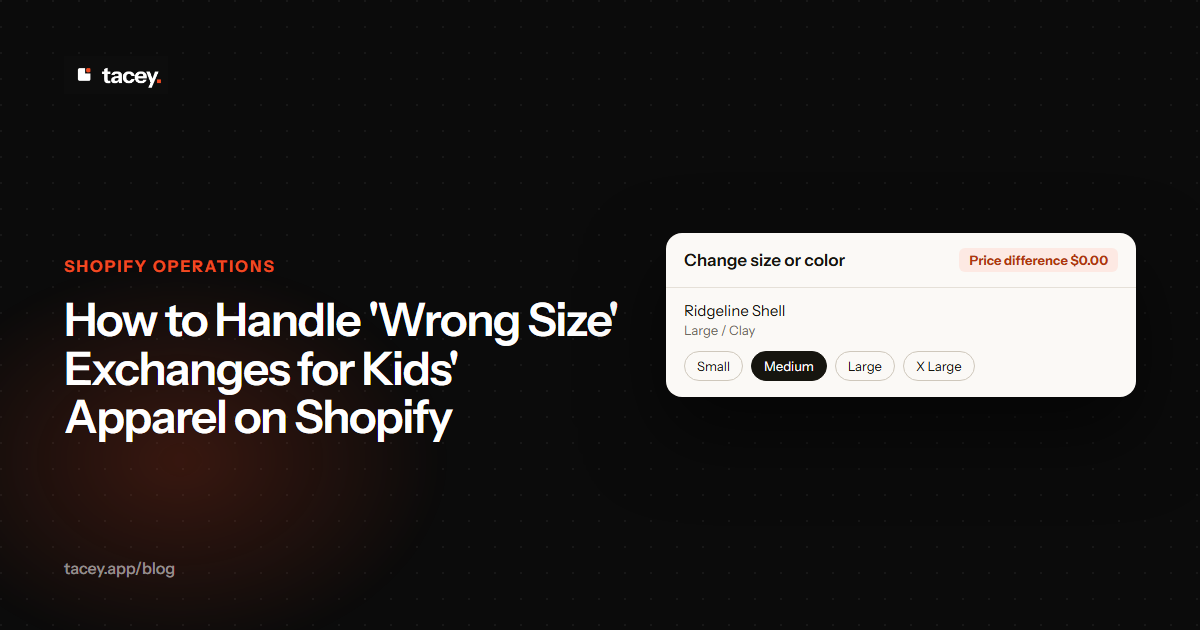
You can let a customer fix a wrong size by using a Shopify app that enables post-purchase order editing. These tools add a section to the Shopify order status page, where a customer can select their order, choose a different size or variant, and confirm the change before it enters your fulfillment workflow.
This self-service approach intercepts the mistake at the earliest possible moment. The customer often realizes they clicked the wrong size just moments after completing the purchase. By giving them immediate control to correct it, you prevent the entire costly exchange process before it even begins. The change is made to the existing order, so you avoid a cancellation and a new purchase.
The edit window trade-off
The key to making this work is the "edit window," a fixed period after purchase during which a customer can make changes. This presents a trade-off. A longer window gives more customers time to catch mistakes, but it can delay your fulfillment process. A shorter window gets orders to your warehouse faster but may close before a customer notices their error.
Most merchants find a sweet spot between 30 minutes and two hours. This is typically long enough for a customer to review their order confirmation email and spot a mistake, but short enough that it does not disrupt the warehouse's ability to pick and pack orders efficiently. The right duration depends entirely on your specific operational speed.
With an app like Tacey, this capability is available right on the order status page your customers already see after checkout. The "Change quantity or remove items" tool, which is on by default, allows a customer to swap for the correct size. [Product Facts] This simple action avoids a support ticket, a return shipment, and a frustrated customer, turning a potential problem into a smooth experience.
What's the difference between Shopify's native returns and an app?
Shopify’s native returns provide a basic framework for managing return requests within your admin, which is often sufficient for stores with low return volume. A dedicated returns app adds a layer of automation, a branded customer-facing portal, and advanced rules that become necessary as a store scales.
With Shopify's built-in tools, customers can request a return through their account, and merchants can create returns, issue refunds, and manage restocking. However, it lacks features like automated approvals based on return reasons or customer-initiated exchanges. The process can still require significant manual intervention from your support team.
A specialized returns app automates these workflows. It can provide a polished, self-serve portal where customers manage their own exchanges, print labels, and even opt for store credit, sometimes with an added incentive. These apps offer more complex policy rules, such as blocking returns on final sale items or offering instant exchanges to foster loyalty.
How do I set up a self-serve exchange portal?
Setting up a self-serve exchange portal typically involves installing a returns management app from the Shopify App Store. These apps create a branded page where your customers can start an exchange or return using their order number and email address, without needing to contact your support team.
While the exact steps vary by app, the general process follows a consistent pattern:
- Install a Returns App: Choose an app from the Shopify App Store that offers a customer-facing returns portal and exchange capabilities.
- Configure Your Return Policy: Within the app's settings, define your rules. Set your return window, specify which items are eligible for exchange, and decide if you will charge for return shipping.
- Customize the Portal: Add your logo, brand colors, and customize the text to match your store's voice. A good portal feels like a natural extension of your website.
- Integrate with Shipping Carriers: Connect your shipping accounts to automatically generate return labels for your customers.
- Link to Your Store: Add a link to your new returns portal in your store's footer and on your order confirmation emails so customers can easily find it.
Handling price differences in exchanges
A common edge case breaks simple exchange systems: what if the customer wants to swap for an item with a different price? For example, exchanging a $22 toddler t-shirt for a $28 youth size, or swapping for a different color that happens to be on sale. A basic exchange process cannot handle this.
Look for a returns app that can manage these "uneven exchanges" gracefully. The best tools will create a new order for the desired item and apply the value of the returned product as a credit. If the new item is more expensive, the customer is prompted to pay the difference. If it is cheaper, the system can issue a partial refund or store credit.
Can I offer store credit instead of a refund for returns?
Yes, you can offer store credit on Shopify, and it is a powerful strategy for retaining revenue from returns. Both Shopify's native return process and most third-party return apps allow you to issue store credit as a refund option. When a customer chooses store credit, the money stays within your business.
This approach turns a potential loss into a future sale. Many merchants incentivize this choice by offering a small bonus, such as an extra 10% on the credit amount, if a customer opts for store credit over a cash refund. This encourages loyalty and often leads to a higher lifetime value, as customers are guaranteed to shop with you again.
Frame the store credit bonus as a "thank you" for keeping their business with you. Instead of just showing "get a $5 bonus," try language like "We'll add an extra $5 to your credit as a gift." This small shift in wording reframes the transaction from a simple return into a positive customer service interaction, making the choice for credit feel like a reward.
Shopify's system integrates store credit with customer accounts. When you issue a credit, it's added to the customer's profile and can be applied during checkout on their next purchase. This makes the process seamless for the customer and easy to manage for the merchant, all without needing a complex workaround.
We believe the customer who spots their own mistake is your most motivated problem-solver. Giving them the tools to fix it instantly, before the box is even packed, turns a potential cost into a moment of trust.
How can I prevent inventory data corruption from exchanges?
Prevent inventory corruption by using an integrated system that treats an exchange as two distinct but linked transactions: a return and a new order. When a manual exchange happens, there's a risk a team member just grabs an item off the shelf, causing inventory levels to become inaccurate for both the returned and the new product.
A proper exchange workflow, usually managed by a returns app, automates this process correctly. When a customer selects a new size in your exchange portal, the system should ideally place a new order for that item (often at zero cost to the customer). This immediately deducts the new size from your available stock count in Shopify.
The cost of getting this wrong is high. If your inventory count is off, you might sell an item that is actually out of stock. This forces you to cancel the order, apologize to a disappointed customer, and lose a sale. Worse, you might show an item as out of stock when you have units on the shelf, losing out on sales you could have fulfilled.
Simultaneously, the system processes the incoming item as a return. Your inventory for the returned size is not updated until the physical item arrives at your warehouse and is inspected. Once it's deemed sellable and restocked, the app signals Shopify to increase the stock count for that variant. This two-step process ensures your inventory data remains accurate at all times.
Ultimately, handling size exchanges is about giving customers fast and easy ways to get the right product. While better sizing charts prevent a portion of mistakes, the most powerful tool is allowing parents to correct their own errors moments after purchase. By enabling post-purchase order editing, you stop the costly exchange process before it starts.
To prevent costly and time-consuming exchanges for kids' clothing, Tacey gives parents the power to correct a wrong size on their order immediately after purchase, right from the order status page. See how simple it can be to reduce exchanges by exploring Tacey's order editing features or install it from the Shopify App Store today.
Frequently asked questions
How long should I give customers to change their order?
The window for customers to edit their order should be based on your fulfillment speed. Most merchants set a window between one and four hours, as this is typically the gap between when an order is placed and when it gets sent to the warehouse for picking and packing.
What's the best way to handle gift exchanges for size?
Make the process as simple as possible for the gift recipient. Use a returns portal that only requires the order number and shipping zip code, so the original buyer isn't bothered. Offering store credit is also a great option for gift returns, as the recipient can choose something else they love.
Should I charge for return shipping on exchanges?
Many apparel brands offer free shipping on size exchanges as a gesture of goodwill. While you incur a cost, the positive customer experience can lead to repeat business. If you do charge, be transparent about the fee on your return policy page.
Can I automate the approval of size exchanges?
Yes, most dedicated returns and exchange apps allow you to set up automation rules. You can configure the system to automatically approve any exchange request where the customer is swapping for a different size of the same product, which saves your support team significant time.
How do I measure the success of my new exchange process?
Track key metrics like the number of exchanges versus cash refunds, the percentage of customers who opt for store credit, and your overall return rate over time. Also, monitor customer support tickets related to sizing to see if they decrease after implementing a self-serve portal.
 Install on Shopify