tacey
tacey Install on Shopify
A customer places an order and immediately realizes they picked the wrong size or mistyped their apartment number. Without the right tools, this common mistake becomes a support ticket, a delayed shipment, and a manual fix for your team. A simple error can quickly turn costly. A rep might change an address in Shopify, but the old details were already sent to the warehouse. The result is a lost package, an unhappy customer, and the full cost of shipping a replacement.
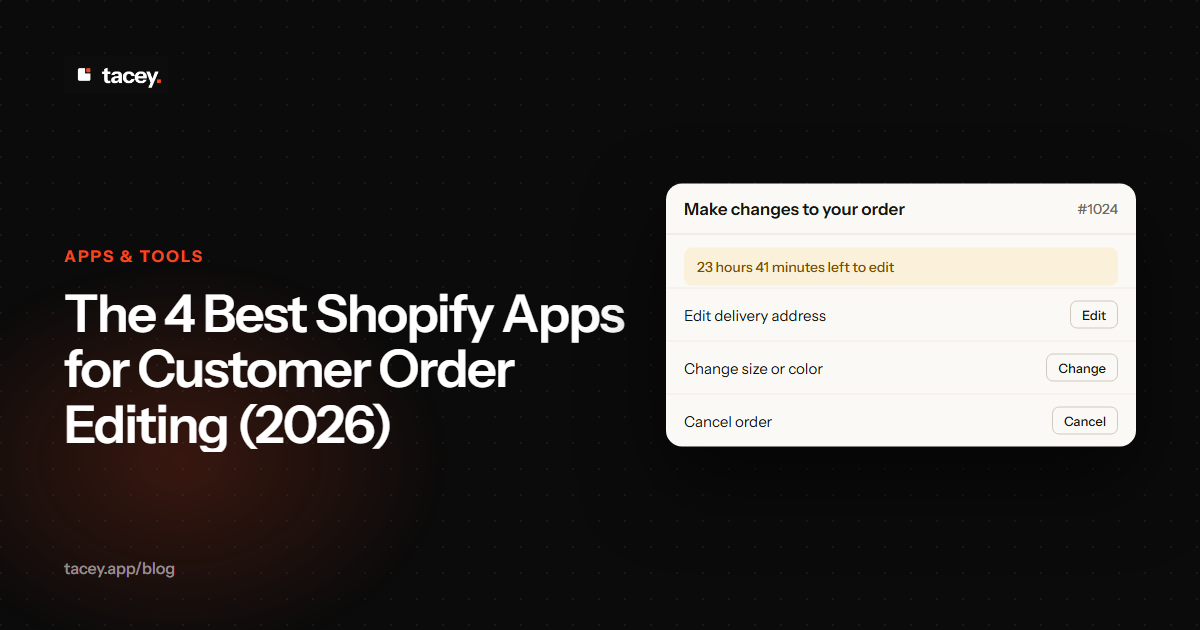
The best Shopify order editing app solves this by letting customers fix their own orders right after purchase, before the order reaches your fulfillment team. These apps work on the order status page Shopify already sends to every customer. This narrows the window for costly errors and frees up your support staff from handling routine changes. This guide compares the top self-service order editing apps to help you find the right fit for your store's volume and specific needs.
| App | Starts At | Best For | Key Differentiator |
|---|---|---|---|
| Tacey: Order Editing & Merge | $29/month | Most stores getting started | All features, including order merge, on all plans. |
| OrderEditing.com | $99/month | High-volume or Shopify Plus | Deep integrations with WMS and ERP systems. |
| Revize: Order Editing & Upsell | Free | Testing with a free plan | Free plan for up to 20 edits per month. |
| AE: Order Editing & Upsell | $39/month | Mid-market stores | Polished UI and strong mid-tier feature set. |
What is the best order editing app for most stores?
Tacey: Order Editing & Merge is a strong choice for its comprehensive features at an accessible price. It provides a full suite of post-purchase tools on the order status page, including address validation, order merging, and post-purchase upsells. This makes it a unified tool for many growing merchants.
Full disclosure: we make Tacey. We built it to combine several post-purchase functions into a single app. The goal is to give merchants a unified tool to manage the critical period between payment and fulfillment. Customers can edit their shipping address, change product variants, update quantities, and even cancel their order within a time window you set.
Key features include:
- Self-Service Editing: Customers can edit their address, variants, and quantity on the order status page.
- Merchant Order Merge: Combine separate orders from one customer into a single shipment to save on costs.
- Post-Purchase Upsells: Customers can add items to their existing order before it ships.
- Address Validation: Address validation helps reduce shipping errors before they happen.
Tacey's pricing starts at $29/month with a 14-day free trial. All features, including post-purchase upsells, are on every plan. Pricing tiers are based only on monthly order volume, making it a predictable cost for growing stores.
Which order editing app is best for Shopify Plus?
OrderEditing.com is the top choice for high-volume Shopify Plus brands needing deep fulfillment integrations. Its strength is its extensive connections with 3PLs, warehouse management systems (WMS), and ERP software like NetSuite. This focus ensures order edits are reliably communicated to downstream systems, which is critical for large-scale operations.
The platform is a market leader with a near-perfect rating from over 330 reviews. For a brand shipping thousands of orders a day, a weak integration is a major liability. A single failed edit can cost over $40 in shipping, labor, and support time. Paying a higher price for an enterprise app like this is insurance against these costly, recurring failures.
While its starting price of $99/month is higher, the investment is justified for businesses where a single fulfillment error is very costly. It provides robust self-service options, including address edits, item swaps, and cancellations. It is built for operations where editing is a core part of the fulfillment workflow.
Is there a free Shopify app for order editing?
Yes, Revize: Order Editing & Upsell offers a free plan for up to 20 order edits per month. It is an excellent choice for new stores testing self-service editing. The app is "Built for Shopify," meeting high standards for performance, and includes key features like address and variant changes on its free tier.
A free plan with a 20-edit cap is perfect for testing the waters. However, it can become a liability during unexpected growth. If a product goes viral, you could hit the cap in days, forcing the remaining edits into manual support tickets. For rapidly scaling brands, a paid plan with unlimited edits is a safer choice. Revize's paid plans start at $49/month.
One of Revize's key differentiators is its deep integration with subscription apps. This allows customers to edit their recurring orders, a significant advantage for brands that rely on a subscription model. It offers a compelling balance of features and value, especially given its free entry point.
What's a good mid-range order editing app?
AE: Order Editing & Upsell is a strong mid-market option with a polished user experience. Starting at $39/month, it provides a robust feature set, including post-purchase upsells, without an enterprise price tag. It is ideal for growing stores that have outgrown free plans but do not need complex integrations.
AE excels for brands in the middle ground. Its polished UI means a simple process for the customer and a setup that takes minutes for the merchant. A growing brand might find a free plan's limits risky, while an enterprise app is overkill. AE provides unlimited edits and key features on its entry plan, avoiding both risks.
Merchants praise it for reducing support tickets by allowing customers to manage their own orders. Its user interface is often highlighted as clean and easy to use for both the merchant and the end customer. It is a popular choice for merchants who need a reliable, all-around solution.
What can a customer edit in a Shopify order?
With an order editing app, you control what customers can change on their order. Common editable fields include the shipping address, contact email, product variants like size or color, and item quantities. Most apps also allow customers to add or remove products or cancel the order entirely within a set time frame.
How long should an order editing window be?
The ideal window is the time between order placement and when your fulfillment team starts processing it. For most stores, this is between one and four hours. If your warehouse pulls orders every 30 minutes, your edit window should be shorter. The goal is to give customers time to catch mistakes without disrupting your shipping workflow.
If you use a third-party logistics (3PL) provider, your edit window must sync with their schedule. A concrete step is to define this cutoff in your Service Level Agreement (SLA) with the 3PL. This ensures edits are locked before they pull their first batch of orders for the day.
Do these apps work on all Shopify plans?
Yes, all the apps listed here work on every Shopify plan, from Basic to Shopify Plus. Unlike some checkout modifications that require a Plus subscription, post-purchase editing happens on the standard order status page. This makes these tools accessible to merchants at any stage of growth.
Choosing the right tool comes down to your operational reality. An app that can pause fulfillment might be essential for one store, while another might prioritize a free plan to get started. By enabling customer self-service, any of these apps can help you reduce support costs and create a smoother post-purchase experience.
Frequently asked questions
Can customers edit their orders natively in Shopify?
No, Shopify does not offer a native feature for customers to edit their own orders after payment. This functionality requires a third-party app from the Shopify App Store. Without an app, any changes must be made manually by the store owner in the Shopify admin.
What happens if a customer adds an item and the price changes?
Most apps create a new payment request if a customer adds an item or chooses a more expensive variant. They prompt the customer to pay the difference before confirming the change. Similarly, they may process a partial refund if an item is removed or swapped for a cheaper one.
How do these apps handle inventory?
When a customer edits an order, the app adjusts inventory in real-time. It releases the stock for the original item and reserves it for the new one. The best apps place a temporary hold on inventory during the edit to prevent another customer from buying the last item, which avoids overselling.
Can a customer change their shipping address after the order has shipped?
No, once an order is fulfilled and has a tracking number, the shipping address cannot be changed through an order editing app. These apps only function in the window between when an order is placed and when the fulfillment process begins.
Do order editing apps reduce returns?
Yes, they can help reduce returns caused by simple errors. For example, if a customer can correct a wrong size or color choice moments after ordering, it prevents the incorrect item from being shipped. This avoids a situation that would have otherwise resulted in a return and exchange.
Will installing an order editing app slow down my store?
No, these apps primarily operate on the post-purchase order status page. They do not add code to your product pages or theme that would impact your storefront's loading speed. Your Shopify Speed Score will not be affected.
How do these apps prevent fulfillment errors?
The primary mechanism is the editing window, which you can set to close before fulfillment begins. Some advanced apps also integrate directly with warehouse software to place a temporary hold on an order while it is being edited. This ensures the final, correct version is what gets picked and packed.
 Install on Shopify