tacey
 Install on Shopify

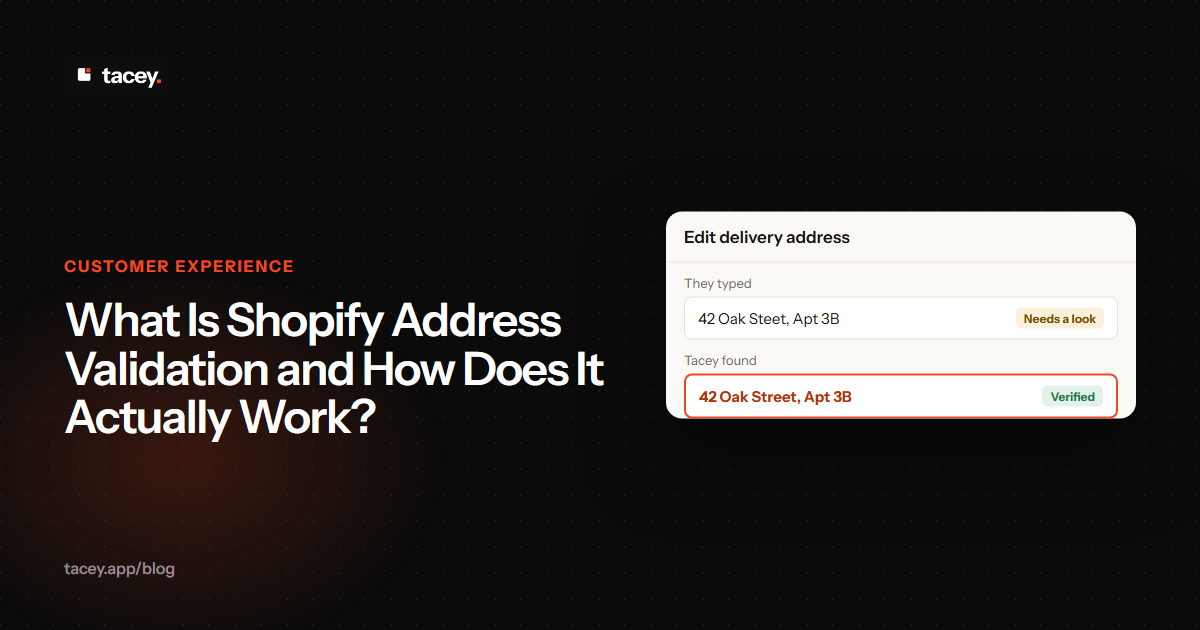
Shopify address validation is the process of checking a customer’s shipping address against a database to catch errors before an order ships. It is a store’s primary defense against the typos and missing details that lead to failed deliveries, but how the validation works is as important as whether it happens at all.
Most merchants think of validation as something that happens during checkout. A customer makes a mistake, and a pop-up asks them to fix it before they can pay. But another method exists: validating the address immediately after payment, on the order status page. This distinction is the key to reducing shipping errors without adding friction that could cost you the sale.
What is Shopify address validation, exactly?
Shopify address validation is an automated process comparing a customer's shipping address against official postal data to catch potential errors. The goal is to identify issues like misspelled streets, wrong postal codes, or missing apartment numbers before a shipping label is printed, which helps reduce returned packages. [1]
This process is usually handled by a third-party app or a feature built into the Shopify platform itself. The technology behind it involves Application Programming Interfaces (APIs) that send the address information to a validation service, which then returns a confirmation or a suggested correction. This all happens in a matter of seconds.
The validation can range from simple typo correction to confirming the address exists in a postal database. More advanced systems can also verify unit numbers, like apartments or suites, and determine if an address is residential or commercial. This level of detail is crucial for preventing delivery failures and avoiding unexpected shipping surcharges. [2]
How does the validation process actually work?
The core of address validation is a comparison. When a customer submits their address, the system sends it to a service that maintains vast, up-to-date address databases. This service checks the submitted address against its records to confirm that it is a known, deliverable location.
The process typically involves three steps: parsing, standardizing, and validating. First, the system parses the address, breaking it down into components like street number, street name, city, and postal code. Next, it standardizes these components into a consistent format recognized by postal carriers.
For example, an entry like "123 main street, apt 4, new york" is parsed into its parts. Then, it's standardized to "123 MAIN ST APT 4, NEW YORK, NY 10001" to match the official format of the postal service. This standardization is a crucial step that enables an accurate comparison against the official database.
Finally, it validates the standardized address against its database. If the address is a perfect match, it's marked as valid. If it's close but has a typo, the system might suggest a correction. If it's completely unrecognizable, it will be flagged as invalid.
In the United States, the highest level of validation is CASS Certification from the USPS. This certification ensures that the validation software can accurately correct and standardize addresses to meet postal requirements. It verifies that an address is not just real but also deliverable by checking it against the USPS database.
A CASS-certified system can identify if an address is missing a secondary number (like an apartment or suite) or if it's a commercial address being treated as residential. This deeper level of validation helps prevent the most common and costly delivery failures, going beyond simple typo correction.
Beyond text matching, some advanced services add geocoding to the process. This step plots the address coordinates onto a map to confirm its physical existence. Geocoding can also determine if the location is residential or commercial, a key detail for shipping rates. This provides a higher level of confidence than database verification alone, ensuring the address is not just valid in theory but reachable in practice.
Why are wrong addresses such a costly problem?
Wrong addresses are a costly problem because a single error triggers a cascade of direct and indirect costs. Beyond the initial shipping label, you face return fees, reshipment costs, and customer support labor. These expenses quickly erode profit margins and damage customer trust, turning one mistake into a significant financial loss. [1, 3]
A Worked Example: The Real Cost of One Bad Address
Imagine a customer buys a $75 product from your store. The address they enter has a typo in the street name. Your fulfillment team doesn't catch it, and the package is shipped. The carrier cannot find the address and marks the package as "undeliverable."
First, you lose the initial shipping cost. Then, the carrier typically charges a fee to return the package to you. On top of that, some carriers like FedEx and UPS charge an address correction surcharge for the manual work involved. These fees alone mean you have lost money before even solving the customer's problem.
Next, the customer contacts your support team. The labor cost for a support agent to spend time diagnosing the problem, communicating with the customer, and arranging a reshipment adds another direct expense to the order. This single error has now incurred multiple charges from different sources.
You then reship the order, paying for postage a third time on the same sale. The total cost of this one mistake can easily erase the entire profit margin on the original product. Even worse, many customers who experience a failed delivery will not shop with that store again, representing a permanent loss of future revenue.
A paid order with a risky address is a problem to solve. A lost sale from a blocked checkout is a problem you can't.
When a failed delivery turns into a return, the costs multiply again. You face restocking fees, potential product write-downs, and the permanent loss of that customer's future business. Preventing these errors at the source is one of the highest-leverage operational improvements a store can make.
What is the difference between checkout and post-purchase validation?
The main difference is timing and its effect on the customer. Checkout validation happens before a customer pays, while post-purchase validation happens immediately after. This distinction determines who is responsible for fixing an error and whether a potential sale is put at risk.
Checkout validation, also called pre-purchase validation, interrupts the payment process. If an app detects a potential address error, it will often block the customer from completing their purchase until they fix it. This approach can reduce shipping errors but also introduces friction at the most critical moment of the sale, potentially leading to cart abandonment.
The Conversion vs. Accuracy Trade-Off
Merchants using pre-purchase validation face a direct trade-off between conversion and accuracy. An aggressive validator that flags every minor issue can frustrate users and hurt sales. A lenient one may let too many errors slip through, defeating the purpose. Finding the right balance is difficult and varies by store.
An important edge case is the "correct but unverified" address. This happens with new construction or in rural areas where addresses are not yet in postal databases. A strict pre-purchase validator would block this legitimate order, forcing the customer to either abandon the purchase or enter a different, incorrect address just to proceed.
Post-purchase validation checks the address after the order is confirmed and paid for. This secures the sale first. If an issue is found, the order can be flagged for review by your team, or the customer can be prompted to correct the error on the order status page. This method avoids any risk of losing the sale due to checkout friction.
Does Shopify have built-in address validation?
Yes, Shopify has a native address validation feature available on all plans. It automatically checks shipping addresses when a customer places an order and displays a warning in the Shopify admin if it detects a potential issue. This feature provides suggestions for corrections, which merchants can accept or ignore before fulfilling the order. [6]
Shopify's tool is active by default and works for a specific list of countries, including the United States, Canada, and most of Europe. For stores on the Shopify Plus plan, merchants can also enable settings to have Shopify prompt customers with address suggestions during the checkout process itself. For non-Plus stores, the validation happens in the admin after the order is placed. [6]
The reason this pre-purchase prompt was historically a Plus-only feature relates to Shopify's checkout architecture. It required access to the `checkout.liquid` file, which Shopify limited to Plus merchants. With the move to Checkout Extensibility, this is changing, but app-based checkout validation still generally offers more power and requires a Plus plan for blocking rules.
While helpful, Shopify's built-in tool is a basic check. It is good at catching major typos but often fails to verify the existence of a specific apartment or suite number. This is a critical gap, as a missing unit number is a leading cause of delivery failures in residential buildings. [3]
When should you use a third-party address validation app?
You should consider a third-party app when your shipping errors are becoming costly or when you need more control than Shopify's native tool offers. If you frequently ship internationally, deal with high order volumes, or want to enforce specific rules, a dedicated app is a worthwhile investment.
For a high-volume store, these costs scale quickly. A merchant with 5,000 monthly orders and a modest 1% address error rate faces 50 failed deliveries each month. With industry research putting the average cost of a single failed delivery at over $17 per failure, that's a direct loss of more than $850 monthly. This does not even account for the cost of customer support time or lost lifetime value.
Apps like AddressGuard, Clearer.io, and Address Ninja offer more advanced features. These can include forcing corrections for missing apartment numbers, blocking deliveries to PO boxes, or validating addresses against carrier-specific data from services like UPS and FedEx, not just postal service data. [3, 4]
For example, some carriers charge extra for residential delivery. An advanced app can check the address type and flag a mismatch if the customer chose a commercial shipping rate for a residential address. This prevents unexpected surcharges on your carrier invoice, saving money on a detail that native tools miss.
The decision also depends on your Shopify plan. If you are on a standard plan and want to validate addresses before payment, you will need an app that can enforce rules at checkout. If you prefer to avoid checkout friction, an app that focuses on post-purchase validation is a better fit.
How does Tacey handle address validation differently?
Tacey approaches address validation from a post-purchase philosophy, designed to protect the sale first and foremost. It validates every shipping address the moment an order is paid for, completely avoiding any friction during the checkout process. This ensures you never lose a customer because of an aggressive validation pop-up.
If Tacey detects a risky address, it automatically adds a tag to the order in your Shopify admin, flagging it for your team's review. Crucially, it never holds or blocks fulfillment. The decision to ship remains entirely with you. This gives your team a chance to investigate without disrupting your standard workflow.
More importantly, Tacey empowers the customer to solve the problem themselves. On the standard Shopify order status page, the customer can edit their own shipping address. This is one of several self-service order editing options Tacey provides, resolving issues without requiring any action from your support team. [4]
Configuring this edit window is a concrete step you take during setup. A common best practice is to set the window to 30 or 60 minutes. This provides enough time for a customer to notice and make a correction, while still being short enough to sync with your warehouse's fulfillment software before the order is processed for picking and packing.
What should you look for in an address validation tool?
When choosing a tool, focus on four key areas: the validation method, Shopify plan compatibility, international coverage, and workflow impact. The right tool for another store might be the wrong one for you.
First, decide between pre-checkout and post-purchase validation. If you want to force corrections before payment, you need a pre-checkout tool, which may require Shopify Plus. If you want to eliminate checkout friction, a post-purchase tool is better. Second, confirm the app works with your Shopify plan and any express checkouts you use, like Shop Pay or PayPal.
Third, check the tool's international coverage if you ship outside your home country. Some apps have much better support for global addresses than others. Validating an address in Japan, with its different format, requires a more sophisticated system than one built only for North America. Check the app's list of supported countries. [4, 5]
Fourth, consider how the app fits into your operations. Does it simply tag orders, hold them from fulfillment, or allow customers to make their own corrections? Choose the workflow that best suits your team. A system that holds orders might create a bottleneck if your team isn't prepared to review them promptly.
Finally, evaluate the customer-facing interface. If the tool suggests corrections, are they clear and easy to understand? For a post-purchase tool, how does it notify the customer? A subtle, well-designed notification on the order status page is more effective than a confusing email. Good design here improves the customer experience and the fix rate.
A good address validation system reduces costs and protects your customer relationships. By catching errors early, you ensure more packages arrive on the first attempt, which is the foundation of a positive delivery experience. For stores looking to balance accuracy with a smooth checkout, a post-purchase approach offers a powerful solution, securing the revenue before solving the logistics.
Frequently asked questions
Can Shopify address validation fix every mistake?
No, address validation is not infallible. It can catch common typos, formatting errors, and non-existent addresses, but it cannot know if a customer meant to ship to their home instead of their office, or if they entered a neighbor's valid address by mistake.
Will address validation slow down my store's checkout?
Pre-purchase validation apps that run during checkout can add a brief delay or an extra step for the customer. Post-purchase validation, which runs on the order status page after payment, has no impact on checkout speed at all.
Does address validation work for international orders?
Most modern validation tools offer international support, but the quality can vary. The best apps validate against postal data from hundreds of countries to ensure accuracy. Always check an app's supported country list if you have a global customer base. [4, 5]
What is the difference between postal and carrier validation?
Postal validation checks an address against a country's national postal service database (like the USPS). Carrier validation goes a step further, a practice some advanced apps use, checking against the databases of specific carriers like UPS or FedEx to identify addresses they don't service, even if the address is postally correct.
Is address validation available on all Shopify plans?
Yes, some form of address validation is available on all plans. Shopify's native validation is available to all merchants in the admin. However, using apps to block checkout based on address rules typically requires Shopify Plus. Post-purchase validation apps generally work on all plans. [6]
Can I block PO Box addresses with these tools?
Yes, many third-party address validation apps allow you to create rules to block specific address types, such as PO boxes, military addresses (APO/FPO), or parcel lockers, from being used at checkout. [1]
 Install on Shopify