tacey
 Install on Shopify

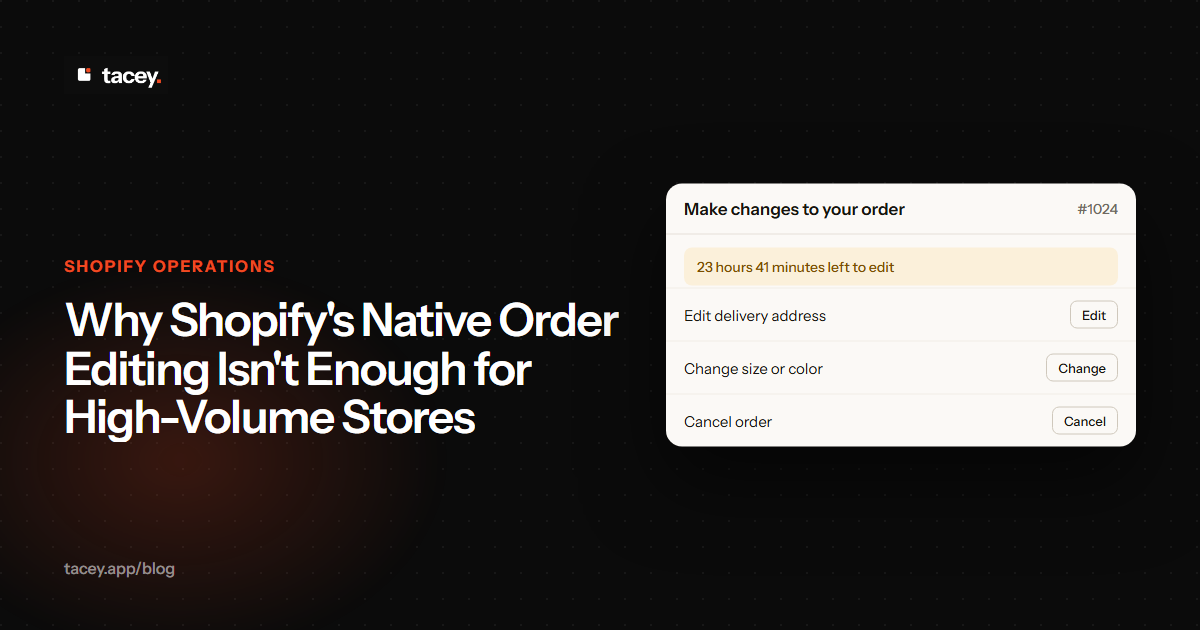
Shopify's native order editing is not enough for high-volume stores because it lacks any customer self-service, making every change a manual task for your team. This creates operational bottlenecks and increases support costs as order volumes grow. A process that is manageable for a few orders a day quickly becomes a major source of delays and errors at scale.
What is Shopify's native order editing?
Shopify's native order editing is a merchant-facing tool within the Shopify admin that allows you to modify an order after it has been paid but before it has been fulfilled. This functionality lets you perform several core actions directly on an order, such as adding new products, removing or changing the quantity of existing items, and even applying discounts after the fact. It’s designed for manual adjustments made by you or your staff.
You can also update a customer's shipping address or edit their contact information. Essentially, it gives you the ability to correct mistakes or accommodate customer requests that arrive through your support channels. The key is that every action happens inside your store's backend, initiated by your team, as described in Shopify's own help documentation. [3]
Where does native editing work well?
For stores with a low order volume or very few customer change requests, Shopify's native editing is often an adequate solution. If a long-time customer calls you to swap a product color, you can easily open their order and make the change without needing another app or a separate subscription.
It's a safety net for merchants, providing a necessary function for manual oversight and one-off interventions. For businesses where each order is handled with a high degree of personal attention, this manual tool can feel like a natural part of the workflow. The problems begin when that workflow has to scale.
The tipping point often arrives without warning. One successful marketing campaign or a viral social media post can double your order volume overnight. Suddenly, the "occasional fix" becomes a constant flood of support tickets. The workflow that felt natural yesterday is now the primary source of shipping delays and customer complaints.
What are the key limitations for growing stores?
The single biggest limitation of Shopify's native tool is the complete lack of customer self-service, forcing every change to be processed manually by your team. This creates an immediate bottleneck where a customer wanting to switch a size has to find your contact details, send an email, and wait for your staff to act.
For stores with efficient fulfillment, the window to make these changes is often just a few hours. This is the critical period, as data indicates that over 80% of order edits happen before an order is fulfilled. [9] If a customer makes a mistake on a Friday evening and your team is offline, that order will likely ship with the original error, as the native tool is only useful if a human is there to operate it in time.
The anatomy of a manual edit
Let's map the concrete steps. First, the customer's email arrives. Your support agent must stop their current task to read and understand the request. Then, they must communicate with your fulfillment team, asking them to place a hold on that specific order to prevent it from shipping incorrectly while the change is being made. This alone introduces a delay.
This inter-team communication is a major weak point. A request on Slack can be easily missed in a busy channel. An email to a shared fulfillment inbox might not be seen for hours. If the warehouse team prints a batch of packing slips before your agent's "hold" message is seen, the incorrect order will almost certainly ship.
Next, the agent navigates to the Shopify admin, searches for the order, and opens the editing tool. They perform the requested change, like swapping a variant or correcting an address. If the change results in a price difference, the process stalls. The agent now has to generate a payment link and send it to the customer, hoping they complete it quickly.
Only after the change is made and any payment issues are resolved can the agent inform the fulfillment team to release the hold. Each step is a potential point of failure. The agent might pick the wrong order, the warehouse might miss the "hold" message, or the customer might ignore the payment link. This is not a scalable process.
Why can't customers just edit their own orders?
Shopify's platform is built to protect the integrity of a transaction by locking the order details once payment is confirmed, which is a crucial security feature. Think of a paid order as a signed contract; allowing either side to alter it freely after the fact would create chaos with payments, inventory, and fulfillment.
Inventory management presents another major hurdle. Imagine a customer swaps a blue shirt for a red one, but the red variant is out of stock. A manual edit by your team might catch this, but the system itself doesn't prevent it. This can lead to overselling and creating a backorder situation, which causes a second, more serious customer service issue.
These complexities explain the payment challenge. Shopify cannot automatically charge a customer's card for the new total because the original payment authorization was for a specific, lower amount. Re-charging would require storing card details, which is a significant security risk that modern payment gateways are designed to avoid. This is why a new payment link is required.
These complexities are why direct editing is restricted. The native tools provide a controlled way for the merchant to override this lock. However, safely extending that power to the customer requires a third-party application designed to manage these specific risks within a controlled environment, as native editing has several boundaries. [9]
How do these limitations impact customer experience?
Forcing a customer into a support queue for a simple fix creates a frustrating and anxious experience. They know they made a mistake and want to correct it immediately, but are instead met with a confirmation email and no way to act, creating a wave of "did they get my email?" anxiety. This undermines the excitement of their purchase and can lead to a preventable return.
Consider an edge case that manual processes handle poorly: the race condition. A customer emails to change their address. Ten minutes later, they realize they should cancel instead and send a second email. If your agent sees the first email but misses the second, they may "fix" the address and push the order through, creating a far bigger problem.
Your support agent must now defend against the chargeback. This is a time-consuming process of gathering evidence, such as delivery confirmations and email transcripts, to prove the order was legitimate. This administrative burden pulls them away from helping other customers, compounding the operational cost.
The financial fallout from this race condition is severe. The customer, who now has an unwanted item they tried to cancel, is likely to initiate a chargeback. You lose the product cost, the original and return shipping fees, and incur a chargeback penalty from your payment processor. A single process failure turns into a multi-layered financial loss.
In a world of one-click checkouts and instant gratification, telling a customer to "email us and we'll see what we can do" feels slow and outdated. It shifts the burden of a simple data correction from a quick self-service action to a manual, multi-step support process.
What is the real cost of manual order edits?
The most obvious cost is the time your support team spends on repetitive, low-value tasks. Every five-minute fix for a wrong address or incorrect size adds up. As requests increase, you lose hours of staff time that could have been spent on customer acquisition or loyalty programs instead of manual data entry.
Beyond labor costs, there is the cost of errors. When a support agent is manually editing dozens of orders a day, mistakes will happen. The wrong item gets sent, or an address is mistyped, leading to a reshipment cost, a return, or a lost customer. Manual processes are inherently less reliable than automated ones.
The Compounding Costs of Manual Edits
The direct labor cost is the most visible expense. Each request to fix an address or swap a size consumes staff time that could be spent on growth activities. As edit requests increase, this becomes a substantial operational line item, pulling skilled agents away from high-value work and into a cycle of repetitive data entry.
This creates a significant opportunity cost. Instead of proactively engaging with VIP customers, analyzing feedback for service improvements, or assisting with complex sales inquiries, your team is tied up with routine fixes. The business pays not just for the time spent, but for the lost value of what that time could have produced.
Then there is the tangible cost of errors that manual processes introduce. When an agent is rushing through dozens of similar requests, mistakes are inevitable. A mistyped address leads to a returned package and reshipment fees. A wrong variant swap results in an incorrect item being sent, often at the merchant's loss.
The most damaging cost, however, is often hidden. A customer who receives the wrong item because of a mistake they were unable to fix is unlikely to return. While you may save the revenue from that one order, you lose their entire lifetime value. Losing even a few such customers a month can have a greater financial impact than all the direct labor and shipping costs combined.
A customer who can fix their own mistake is not a support ticket. They are a loyal customer who just had a great experience.
How can apps extend Shopify's editing capabilities?
Third-party apps create a secure, post-purchase layer on Shopify's own order status page, and tools like Tacey use this to provide a self-service portal where customers can solve their own problems. By adding this module to the order status page, the same one Shopify emails to every customer, they can correct a shipping address or change a product variant without contacting your support team. This turns a support problem into a positive customer experience.
These changes are recorded and synced with the Shopify order, and the process addresses the manual hold problem directly. Rather than replacing holds, which are sometimes necessary, these apps use an automated system. For example, a hold might be automatically placed if an edit results in a balance due, and then released once the payment is made.
This systematic approach reduces the risk of errors caused by missed messages between support and fulfillment teams. The editing window also closes once an order enters the fulfillment process, so nothing can change after it's too late. This approach bridges the gap in Shopify's native functionality, providing the self-service that high-volume stores require. You can explore the features on our order editing page.
What should merchants look for in an order editing app?
The best solution is one that gives the customer control while leaving the merchant in charge of the rules. Look for an app that operates on the post-purchase order status page, as this requires no theme modifications and works with every customer's existing flow.
Granular control is essential. You should be able to define exactly what customers can and cannot do. Can they change their address but not the products? Can they add items but not remove them? You also need to set a clear time limit for edits, based on your store's unique fulfillment speed.
The trade-off: Simplicity vs. Granularity
When choosing an app, you face a trade-off between simplicity and granularity. Some tools offer a very simple, all-or-nothing approach: turn on editing for one hour, or don't. This is easy to set up but might not match your store's specific operational needs. It could be too restrictive, or too permissive.
More powerful apps offer granular rules. For example, you could allow customers to edit their shipping address but disable the option to cancel the entire order. Or you could permit customers to change the size or color of an item (a variant swap), but not replace the product with a completely different one. This level of control is vital.
This distinction is critical for protecting profitability. If a customer can freely replace any product, they might swap a discounted sale item for a full-price new arrival. By disabling product replacements and only allowing variant swaps (like for size or color), you prevent customers from making this kind of swap, which helps protect your intended sales strategy.
The right choice depends on your business. A store with a simple product catalog and uniform shipping may thrive with a simple tool. A store with complex products and international shipping needs the power of granular rules to avoid creating new problems. Evaluate your own processes before you choose an app.
Finally, consider the pricing model. A transparent, flat monthly fee based on order volume is often more predictable than a per-transaction model, so check an app's available plans to ensure it can scale with your business. Instead of just counting edit requests, try calculating the hours they consume; that number will reveal if the most efficient path is giving customers tools to help themselves, and you can review our own pricing structure for a clear breakdown.
Frequently asked questions
Can I edit an order after it has been fulfilled in Shopify?
No. Once an order is marked as fulfilled or partially fulfilled in Shopify, editing options become significantly limited. You can no longer add or remove items, as the inventory has already been committed to a shipment. [6]
Does editing an order in Shopify automatically charge the customer?
No, not automatically. If your edits result in the customer owing more money, Shopify creates a payment link that you must send to the customer. The additional amount is not charged to their card on file without their explicit action.
What happens if I edit an order that has a discount on it?
When you add or remove items, Shopify recalculates the order total, but discounts are not automatically reapplied. You may need to manually add the discount back to the edited order to ensure the customer receives the correct price.
Why can't I edit some orders in Shopify?
There are several reasons an order may not be editable. These include orders that have been fulfilled, orders processed through certain third-party sales channels, or orders that are part of an accelerated checkout like Shop Pay. The same limitations often apply to returns and exchanges.
Do order editing apps slow down my checkout?
Apps that operate post-purchase, on the order status page, have no impact on your checkout process at all. They only load after the payment is complete, so they cannot affect your site's conversion rate or checkout speed.
 Install on Shopify